Freshsales Review for Inbound-Focused Revenue Teams
Pro tier unlocks the lead scoring and sequences inbound teams actually need.

Freshworks launched Freshsales in 2016, pitching it as a simpler and more affordable alternative to enterprise CRMs⟦c3⟧.
The consensus fit, across reviewers who've tested it at length, lands on SMB and mid-market sales teams somewhere between five and fifty users, looking for automation without the configuration overhead of an enterprise platform⟦c5⟧. That matters more for organizations where sales and marketing activity overlap, since how well the CRM plays with automation tools becomes a live operational question rather than a nice-to-have⟦c6⟧.
This piece looks at Freshsales through a specific lens: inbound-focused revenue teams, meaning pipelines fed by form fills, chat conversations, and campaign traffic rather than cold lists a rep built themselves ⟦c1⟧. Reps in this world spend their time qualifying, routing, and following up on leads they didn't source, which changes what "good CRM" even means ⟦c4⟧. Freshsales earns a 4.5 out of 5 on Capterra across 623 reviews, and a 9.4 out of 10 editor's rating from Business News Daily, both credible starting points⟦c7⟧. But aggregate scores like these flatten plan-level gaps that inbound teams run into specifically, and that's the terrain this review actually walks⟦c7⟧. None of what follows is a verdict. It's a map of where Freshsales lines up with how inbound deals move, and where it doesn't⟦c8⟧.
How Freshsales pricing tiers divide the feature set
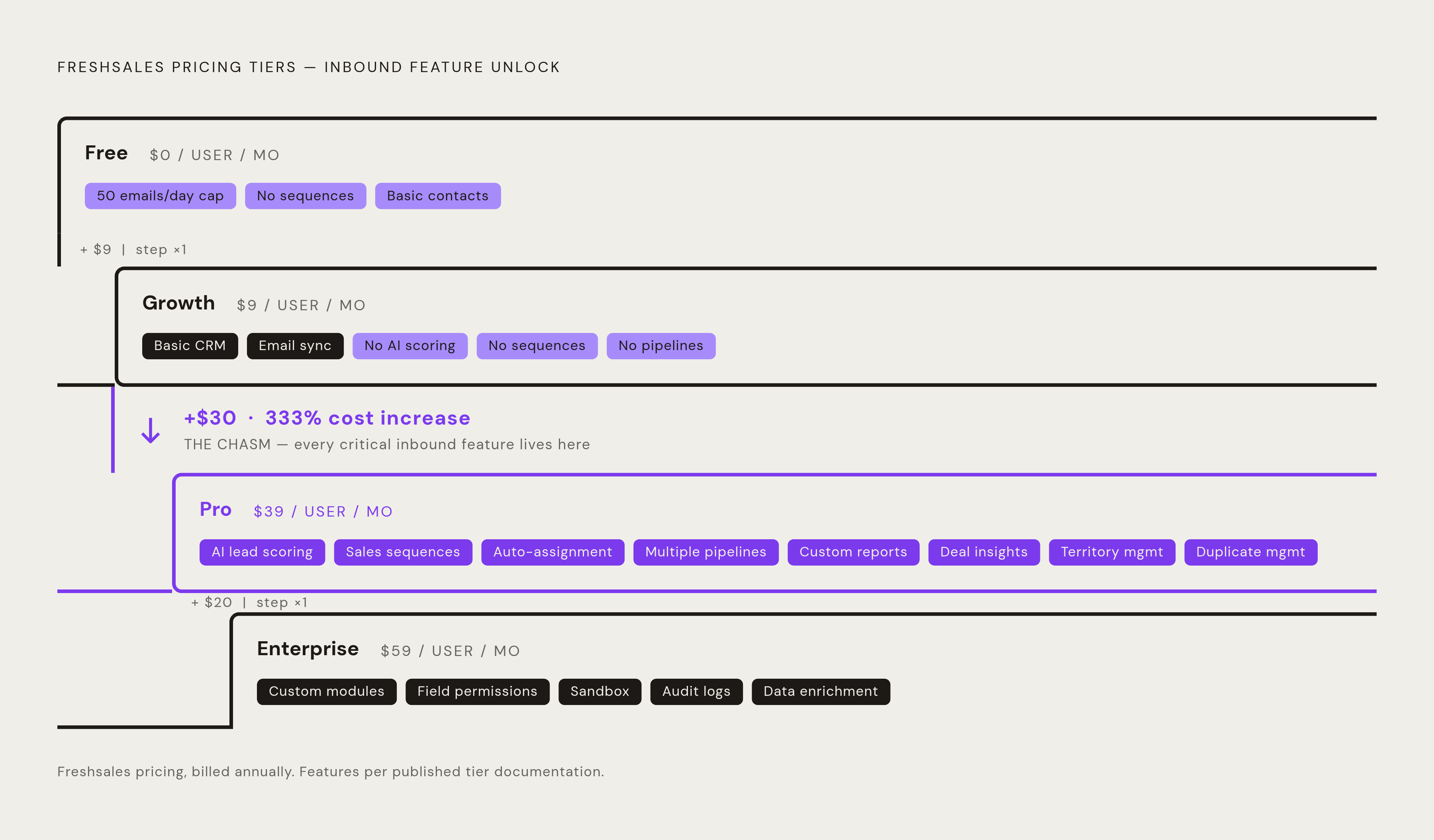
The Free plan is framed as a way to manage customer data on a small team, but it carries no sequence capacity and limits each active user to 50 emails a day, which makes it a trial in practice rather than a working setup for anyone actually running inbound⟦c10⟧.
Growth is where the trouble starts for inbound teams specifically. At $9 a user, it's missing Freddy AI lead scoring entirely, along with sales sequences, auto-assignment rules, multiple pipelines, and custom reports⟦c11⟧⟦c12⟧. A Capterra reviewer summed up the common pattern well, describing the experience of learning that a key functionality promised during the sales process actually needed a much more expensive plan⟦c14⟧. That's not a fringe complaint. It's the most consistent disappointment tied to the Growth tier ⟦c2⟧.
Pro, at $39 a user, is really the functional floor for a team doing inbound seriously⟦c15⟧. It unlocks AI lead scoring, sales sequences, multiple pipelines, advanced workflows, deal insights, and territory management⟦c16⟧. onepagecrm.com's review notes that duplicate management also sits behind Pro because it requires the higher tier's data-handling capacity, which matters a great deal for teams pulling in high lead volumes from several channels at once⟦c17⟧. Enterprise, at $59 a user, adds custom modules, field-level permissions, a sandbox environment, audit logs, and a dedicated account manager, with data enrichment available only at this tier⟦c18⟧.
The jump from $9 to $39 is the defining commercial tension in this whole pricing structure ⟦c9⟧. Onepagecrm.com frames the jump from $9 to $39 as the defining commercial tension for growing inbound teams (not a minor upgrade, but a category shift in cost) ⟦c19⟧. Budget for it accordingly, because line items keep appearing after the seat price. Branded documents run an extra $19 per user per month regardless of tier⟦c20⟧. The Freddy AI Agent costs $49 per 100 sessions once the free allotment runs out, which matters for any team leaning on chat-driven inbound flows⟦c21⟧. Calling is built in, but per-minute rates still apply, and bot sessions run around $100 per 1,000 sessions, priced separately from seats⟦c22⟧. Monthly billing, rather than annual, runs 20 to 30 percent higher, so teams not ready to commit to a year pay a real premium for that flexibility⟦c23⟧. A 21-day free trial with no credit card required gives teams a low-risk way to test all this before picking a tier⟦c24⟧. Workflow automation is capped at 20 workflows, with no automated email sends ⟦c13⟧.
How inbound leads enter Freshsales in the first minutes
Web form submissions land directly in Freshsales, creating a lead record and firing whatever workflow's assigned to it almost instantly, while duplicate detection screens out contacts already in the system before they clutter the funnel⟦c25⟧. Routing at the point of capture can run by territory, product interest, or campaign source, so nobody's manually sorting a queue when the rules are set up right.
One field carries more weight than any other here: Source ⟦c26⟧. Every lead needs it populated, because Source is what determines which workflow fires next, and teams should treat it as a required field at the point of form submission or import rather than an optional nicety⟦c26⟧. If that step is skipped, automation downstream simply doesn't trigger the way it's supposed to.
Chat adds another entry point. Freshchat conversations automatically create Freshsales contacts, which is high-leverage for B2B teams where a chat widget has effectively replaced the "request a demo" form for prospects who are already warm⟦c27⟧. Shared inboxes like sales@ or info@ can be worked by multiple reps at once, with leads auto-assigned and unknown senders spinning up new contact records automatically. Programmatic sources, things like Calendly bookings, webinar sign-ups, or gated content downloads, route in through the Freshsales API or through Zapier and Make, with source tags attached so the workflow logic still knows where the lead came from⟦c28⟧.
Freddy AI adds a genuinely useful enrichment step here ⟦c2⟧. Once a rep adds a lead's email address, Freddy can pull the company name, website, size, industry, and social profiles from public and verified business databases⟦c29⟧. It works best against B2B domains, and it saves the manual LinkedIn lookup that used to eat into a rep's morning⟦c29⟧. That's a real time-saver for anyone handling volume.
Two gaps appear before a team commits ⟦c33⟧. There's no native browser extension for capturing social leads, onepagecrm.com's testing found, though a third-party extension called LinkFresh is available on the Freshworks Marketplace for LinkedIn capture specifically⟦c30⟧. Teams sourcing heavily off LinkedIn or Twitter need to plan around that ⟦c30⟧. Import volume for batch record uploads is configurable per day by the admin, Freshsales' own support documentation states, which matters for teams running frequent bulk imports from outside sources⟦c31⟧.
The omnichannel communication layer's role in inbound response speed
The single biggest differentiator in Freshsales is native multichannel communication built directly into the CRM ⟦c4⟧. Reps place calls, send email, and answer chat without ever leaving the platform, and every interaction logs itself to the contact record automatically⟦c32⟧. That's a meaningfully different experience from toggling between four separate tools and hoping someone remembers to note what happened ⟦c9⟧.
The channel list, available from Pro and up, covers built-in phone with call recording, voicemail drop, and automatic logging, two-way email sync with Gmail and Outlook, live chat, SMS, WhatsApp Business, Facebook Messenger, and LINE⟦c33⟧. Virtual phone numbers cover more than 90 countries, with support for over 150 currencies and multiple languages, which matters directly for any team fielding inbound leads from outside its home market⟦c34⟧. Business News Daily gave the feature set a 9.5 out of 10, and their stated reasoning ties that score specifically to the built-in communications stack⟦c35⟧.
The payoff of all this is the 360-degree contact view: a single chronological timeline showing every email, call, chat, and deal action in one place, so a rep walks into a conversation with full context rather than piecing it together after the fact⟦c36⟧. For teams also running Freshdesk, there's a genuine ecosystem bonus ⟦c3⟧. Open support tickets tied to a prospect's company appear directly in the CRM timeline, so a rep can see there's an unresolved issue before picking up the phone, which changes what that call actually needs to accomplish⟦c37⟧.
Two caveats belong here too ⟦c33⟧. Business News Daily notes the built-in phone system lacks some of the cloud-based call management features that teams with complex call queues would want⟦c38⟧. And bot sessions are priced separately from seats, running around $100 per 1,000 sessions, so teams leaning hard on chat automation for inbound traffic need to fold that into total cost of ownership rather than treating it as included⟦c39⟧.
Freddy AI lead scoring: what the model needs to work
Freddy isn't one thing. It's three distinct products under one brand: Freddy AI Agent, a deflection bot formerly called Freddy Self Service; Freddy AI Copilot, an in-product assistant for reps; and Freddy AI Insights, which handles analytics and forecasting⟦c40⟧. Conflating these leads to confusion about what a given plan actually includes, so keep them separate in your head.
Lead scoring itself, available starting at Pro, works by analyzing contact behavior, email engagement, site activity, social data, alongside demographic fit, to assign a predictive score to each lead ⟦c2⟧. The model behind it trains on a team's own historical conversion data: which leads converted, what they had in common, applied forward to score whoever's in the pipeline now. That means the model gets better with tenure and underperforms early on, which is a mechanical consequence of how predictive scoring works generally, not a flaw unique to this product. It's particularly useful for teams that don't have a dedicated SDR function doing manual qualification⟦c42⟧, since it's effectively doing a first pass of triage that would otherwise fall on a human.
Deal insights, also gated to Pro and above, flags deals showing risk based on engagement patterns, email sentiment, and historical comparisons, and it'll suggest a next step ⟦c2⟧. They're directional, not prescriptive, more "this deal's gone quiet, consider following up" than a detailed play. Freddy also drafts emails with selectable tone, which helps reps move faster on follow-up rather than staring at a blank composer.
The caveat that matters most for inbound teams specifically: Freddy scores whatever's actually in the record, and if the data's thin or missing, there's nothing for it to score⟦c43⟧. Teams migrating over from another CRM start Freddy from zero, with no inherited scoring history carried across⟦c43⟧. That's representative of the experience when data is clean and scoring's configured properly, which is doing a fair amount of work in that sentence. The core Freddy features are available from Growth, but predictive scoring and deal health analysis unlock only at Pro and above⟦c45⟧, a distinction easy to miss when comparing tiers at a glance. On the Pro plan, Freddy lead scoring performs its scoring function as designed ⟦c41⟧. A Capterra reviewer, a co-founder at a software company using the product for 6–12 months, noted that "the intuitive lead scoring and automated follow-up system helped us prioritize high-potential leads, maintaining consistent communication with minimal manual effort," representative of the experience when data is clean and scoring is configured properly ⟦c44⟧.
Pipeline management and workflow automation: the single-pipeline ceiling at Growth
The deal pipeline itself runs as a Kanban-style board ⟦c46⟧. Reps drag deals between stages, assign weighted probabilities for forecasting, and set deal-rotting alerts that default to 30 days but can be adjusted⟦c46⟧. It's a familiar interface, and most reps pick it up fast.
The real constraint appears in the structure, not in the visuals. Growth allows exactly one pipeline, and for any team selling multiple products, running distinct motions for inbound versus partner-sourced versus trial-conversion deals, or operating across multiple regions, a single pipeline genuinely isn't enough⟦c47⟧. This is a frustration that recurs consistently across sources covering growing teams, and it tends to become visible only once a team's already built its process around Growth and then outgrown it ⟦c2⟧. Workflow automation compounds the problem: Growth caps out at 20 workflows with no automated email sends, a limit many teams discover only after they've built their initial setup and hit the wall⟦c48⟧.
Pro is what actually fixes this. It unlocks sales sequences that chain emails, calls, and SMS together, auto-assignment rules, territory management, and advanced workflows⟦c49⟧, the mechanics that turn inbound follow-up into something systematic rather than something that depends entirely on which rep happened to be paying attention that day.
Freshsales fits teams running light-to-moderate outreach, and for heavy outbound volume, somewhere north of 1,000 emails a day, dedicated sending platforms should carry that load with Freshsales serving as the system of record instead⟦c50⟧. That's not a weakness so much as a statement about what the product's built to do. Separately, Freshworks deepened its Slack integration in 2026, syncing deal conversations and sending deal-triggered notifications straight into Slack, with Freddy operating inside the CRM interface for scoring and insights⟦c51⟧, which matters for any team that effectively manages its pipeline from Slack rather than a browser tab.
Reporting and analytics: what inbound teams get out of the box
Freshworks Analytics ships with customizable dashboards, pre-built views for pipeline value, win rates, and team performance, and reports that can be filtered and rearranged⟦c52⟧.
A Capterra reviewer working in e-learning, with more than two years on the platform, pointed to a genuinely practical detail: the analytics section supports self-updating reports that convert cleanly into Excel⟦c54⟧, which matters enormously for any manager who has to produce the same recurring report every week without redoing the export by hand each time.
The friction occurs in two places ⟦c33⟧. First, the Growth tier's platform restricts reporting to whatever pre-built views ship with it⟦c55⟧ by placing custom reports behind the higher tiers, and inbound managers wanting source attribution, campaign-level conversion rates, or stage-by-stage funnel breakdowns need Pro or above to get there. Second, a pattern recurs across multiple sources describing the analytics as requiring more technical comfort than a typical sales team has on hand, with some teams building custom dashboards in external tools just to get the view they actually need. That's a pattern that occurs often enough to count as real. The Android and iOS apps include a Google Maps function for locating contacts geographically, useful for field reps, but performance can lag once contact volume gets large⟦c57⟧, something distributed or field-heavy teams should test before relying on it daily. CRM.org testing, last updated May 14, 2026, described pipelines, reports, and dashboards as "clean, fast, and easy to customize" ⟦c53⟧. Business News Daily's integrations rating is unconfirmed, since 9.3/10 is HubSpot's overall BND editor's rating rather than Freshsales', while ease of use scored 9.3/10, reflecting a platform that is competent but not exceptional in analytical depth ⟦c56⟧.
The marketing automation gap: what Freshsales CRM does not include
The standalone Freshsales CRM doesn't include email campaign builders, landing page creation, journey-based marketing automation, or social campaign tools⟦c58⟧. That's a deliberate scope decision, not an oversight, since those functions live in Freshmarketer and the broader Freshsales Suite instead⟦c58⟧⟦c4⟧.
Even stepping up to the Suite doesn't fully close the gap for teams with real marketing volume ⟦c4⟧. Every Freshsales Suite plan caps marketing contacts at 500, regardless of which tier a team's paying for⟦c59⟧. That number makes it impractical to run actual email marketing at any meaningful scale, no matter how much the account's paying per seat. Inbound teams whose lead volume outstrips a 500-contact list, which describes most teams doing inbound seriously, end up needing a separate marketing automation platform anyway and connecting it back into Freshsales through integration rather than relying on Freshmarketer to carry the full marketing function on its own ⟦c59⟧.
Sources
- Freshsales CRM Review: Is FreshWorks CRM Worth the Pricing?
- Freshsales Reviews 2026. Verified Reviews, Pros & Cons | Capterra
- Freshsales CRM Review and Pricing in 2026
- In-Depth Freshsales CRM Review 2026: Fully Tested and Rated
- Freshsales CRM Review 2026: Pricing & Features
- Freshsales Review 2026: What the 4.5/5 G2 Rating Doesn't Tell You | Blog | MarketBetter
- Freshsales Review 2026: Is It Worth It? Pros & Cons
- geekflare.com