Natural Language Querying in CRM Reporting
Conversational AI helps business users skip the analyst queue and query CRM data themselves.

Almost every business past a certain size runs on a CRM, Salesforce or HubSpot or Dynamics, take your pick. That part's not in question. What's less clear is whether the people using it every day can pull answers out without filing a ticket, waiting three days, and getting a dashboard that answers a question adjacent to the one they actually asked. Natural language querying is supposed to close that gap. This piece looks at what it actually does, where the major platforms have taken it, and where it still needs you to check its work.
Here's the part that catches people off guard the first time they dig into a broken reporting pipeline: the data was never really the problem. CRMs generate mountains of it, timestamped, tagged, cross-referenced across contacts and deals and line items you forgot existed. The hard part is translation. Turning "how's enterprise pipeline looking this month" into something a database can run requires SQL, a BI analyst with a free afternoon, or a dashboard someone built for last quarter's question. Analyst teams burn real days writing queries, pulling from CRM and billing systems, assembling charts, and by the time the deck lands in an inbox, the sales window it was meant to inform has already closed. Static reports, slow refresh cycles, config screens built for ops people instead of the sales VP staring at them at 8am: that's still the world most CRM reporting lives in.
This produces a two-tier system. Analysts can ask the database anything they want. Everyone else gets to look at whatever someone already thought to build for them, and if that happens to answer their actual question, great, and if not, back to the Slack queue. Sales leaders, marketing managers, CS heads: the people making the highest-stakes calls are frequently the ones least equipped to pull their own numbers. NLQ is the industry's attempt to fix that imbalance. Whether it's a good fix yet depends entirely on how it's built, which is most of what this piece is actually about.
What natural language querying actually does in a CRM context
NLQ is a conversational front door to your data. Type or say a question in plain English, get back a chart, a table, or a short written answer. Underneath the hood, a large language model paired with natural language processing turns your sentence into a query the database can execute, runs it, and formats what comes back into something a human would actually want to read.
No SQL bootcamp required, which is the whole point. A rep can type "show me Q2 sales by product line" into the same window they check their calendar in and get an answer without ever learning what a JOIN does. Other things people actually ask, pulled from real implementations covered later on: "how many contacts did we add this month," "show me all leads with a deal value over a certain threshold," "what's my forecast for Q3." None of this is exotic. These are the bread-and-butter questions that used to mean pinging someone in ops and waiting.
The bigger shift is philosophical. Dashboards require you to navigate to a pre-built view and hope it happens to answer what you're asking. NLQ lets you interrogate the data directly, on your terms, the moment you need it. That extends to mobile too: a field rep standing in a parking lot before a client meeting can ask the question on their phone instead of promising to follow up once they're back at a laptop.
Complex multi-condition logic, deep analysis spanning multiple related objects, the governance layer that keeps two people's numbers matching when they ask the same thing differently: all of that still needs real structure sitting behind it. That's what NLQ doesn't do well yet. Where that structure breaks down turns out to be fairly predictable, and almost boring once you've seen it happen a few times. We'll get there.
The semantic layer: the infrastructure that makes NLQ reliable
Worth clearing up early: NLQ depends heavily on more than a language model pointed at your database, and treating it that way undersells what's actually doing the work. What comes back depends enormously on what sits between the language model and the raw data, and that layer has a name. It's called the semantic layer.
A semantic layer translates the internals of a database schema into terms a normal person uses. "Pipeline stage" instead of stage_id. "MRR" instead of a three-table join nobody outside the data team could reconstruct from memory. Skip it, and the model is working directly against raw table structures; AtScale's benchmark testing found accuracy on complex business queries in that setup drops below 20%. That's not a rounding error. That's a coin flip you'd lose most of the time.
Build the semantic layer properly, and the model actually knows what "closed-won" means at your company, which fields get summed versus averaged, how your data is actually shaped instead of how a generic CRM schema assumes it's shaped. Queries go from a gamble to something you can rely on. Cloud infrastructure, Snowflake and BigQuery being the usual suspects, makes storing and querying CRM-scale data at low latency much easier than it used to be. But the plumbing is half the story at best. The semantic layer is doing the unglamorous work that makes the AI's headline features actually true.
So when you're sizing up an NLQ feature in a CRM or BI tool, the presence of AI branding matters less than the mechanics underneath. Try this instead: how is the semantic context built, and who's keeping it current as your data model shifts under it? That single question explains most of why two products running similar underlying models can produce wildly different answers to the same query.
How the major CRM platforms have built NLQ into reporting today
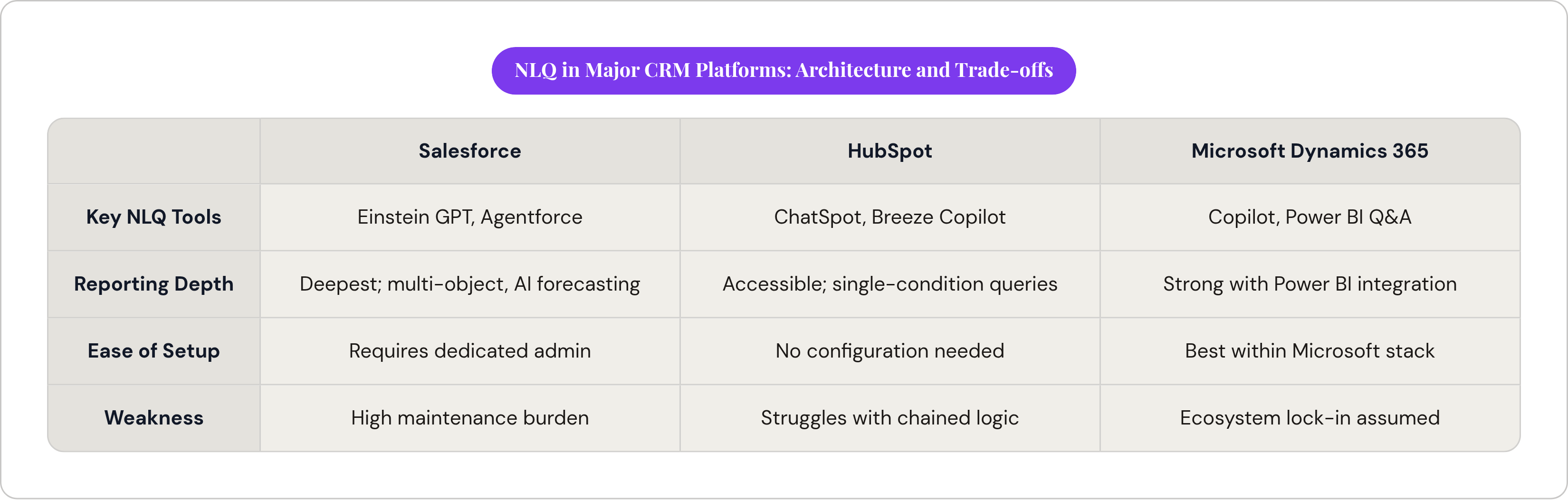
The three dominant CRM platforms have each built NLQ into reporting, but with meaningfully different architectures, depth, and trade-offs. Salesforce built its answer around Einstein GPT and, more recently, Agentforce. Einstein GPT pairs generative AI with CRM data to draft personalized outreach, auto-generate reports, and suggest next steps in real time. Agentforce goes further, running autonomous agents that chain together multi-step analysis without a human manually kicking off each stage. Reporting depth here is arguably the deepest in commercial CRM: custom dashboards, AI-assisted forecasting, live pipeline snapshots, granular cross-object reporting. The catch, and it's a real one, is that this depth assumes a dedicated admin keeping the underlying data model current. Depth and maintenance burden tend to travel together.
HubSpot took a different road with ChatSpot and Breeze. ChatSpot lets someone type or speak a question, "what's my forecast for Q3," "show me all deals at risk in the enterprise segment," and get back an answer, a chart, or a suggested action. Breeze Copilot layers AI assistance across the platform, and Breeze Intelligence adds buyer intent signals and contact enrichment on top of that. It's genuinely accessible: available across plan tiers, nothing to configure, no developer required. Hands-on testing surfaces the cost of that accessibility fast. Ask something layered, enterprise leads in the US who opened an email but never got a call, and ChatSpot tends to shrug and hand you a vague answer, or just punt you toward building the filter manually. Chained, multi-condition logic isn't something the tool generates with much confidence yet.
Microsoft's play, through Dynamics 365, leans on Copilot and Power BI. Copilot for Dynamics 365 uses GPT-based generation paired with Microsoft Graph data to cut routine busywork and surface plain-language insights. Work IQ, rolling out in June 2026, will let Microsoft 365 Copilot reason directly over Power BI's enterprise data and semantic models, returning grounded answers without the user building a query first. Business Central's 2025 AI agents add another layer on top, executing multi-step tasks and generating reports through natural language, which matters most if your org already lives inside the Microsoft stack.
The fair read across all three: each has made real progress on the underlying problem, and each hands the wheel back to a human once complexity crosses a certain line. Where exactly that line sits differs by platform. Progress here has been real but partial, with meaningful gaps still to close.
Whether it's a good fix yet depends entirely on how it's built, which is most of what this piece is actually about.
What changes about day-to-day reporting when NLQ is working well
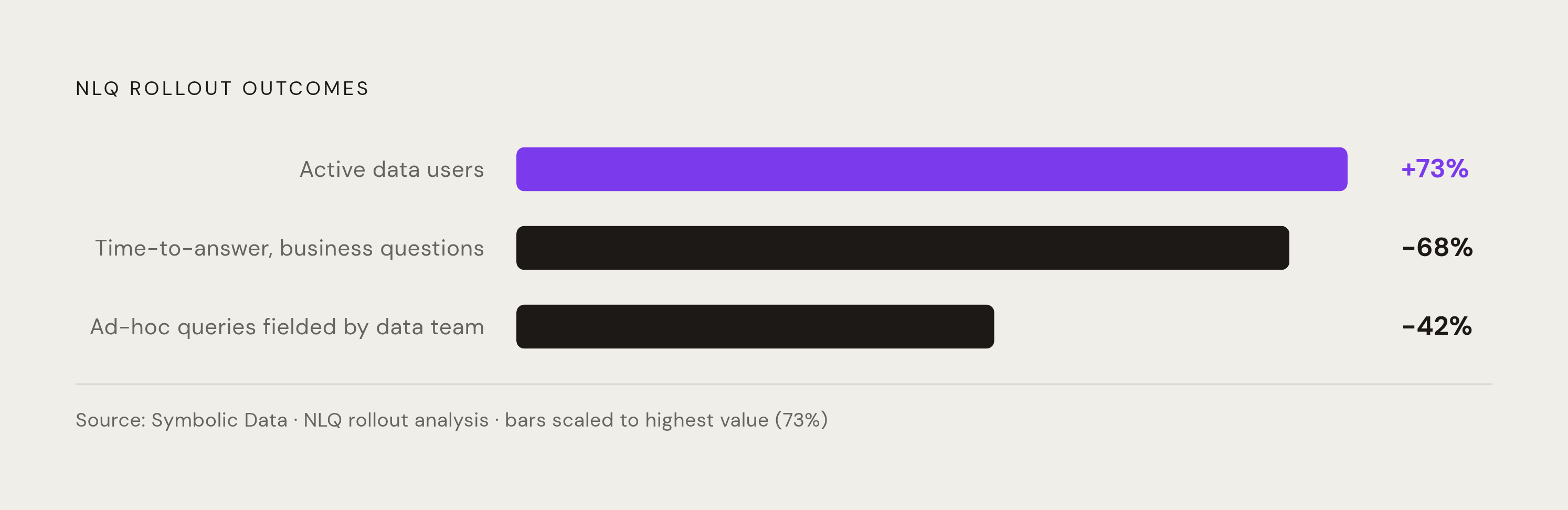
When it works, the ad-hoc request quietly stops being a unit of work. A sales leader who used to email ops for a pipeline cut now just asks the CRM and gets it in seconds, which sounds trivial until you tally how many hours a week that email chain used to eat. Symbolic Data's analysis of NLQ rollouts found a 73% increase in active data users, a 42% cut in time data teams spent fielding ad-hoc queries, and a 68% drop in average time-to-answer for a business question. Those numbers all point at the same shift underneath: the analytics team stops functioning as a request queue and starts doing the harder work it was actually hired to do.
Real deployments back it up with specifics rather than just aggregate percentages. A financial services firm that rolled out a dedicated NLQ platform across its data warehouse, CRM, and marketing analytics saw self-service adoption climb 74% within six months. A mid-size retailer running Power BI Q&A saw business users building their own dashboards jump 47%, while requests to the central analytics team dropped 31%, both inside a three-month window. Different industries, same shape of outcome: people stop waiting in line and start just asking.
Reporting itself starts drifting from rear-view mirror toward something closer to a dashboard warning light. AI agents watching CRM data continuously can flag an unusual shift and surface a rough "why," not just the bare number. Mobile stops being the lesser reporting surface too: a rep mid-meeting can ask a live question instead of promising to "follow up with the numbers" later.
Marketing leaders benefit here more than most, arguably. Campaign performance, lead quality by source, pipeline attribution across touchpoints: these used to sit behind a BI queue with a multi-day lag baked in. Now they're askable while the campaign's still running, while there's still time to actually adjust it instead of writing a postmortem.
Where NLQ still falls short and what that means for teams adopting it now
Hallucination isn't some abstract AI risk you file under "future concerns." It's a specific, fairly predictable failure mode. When a model doesn't have enough schema context or domain grounding, it improvises: a faulty join, a missing filter, an aggregation that looks entirely plausible and is quietly, confidently wrong. Research cited by AtScale flagged this directly, noting LLMs can produce hallucination and interpretability problems tied to gaps in automated metadata capture. Translation: sometimes the system makes up an answer that looks exactly as trustworthy as a correct one.
This matters more here than in most contexts, because the stakes attach directly to real decisions people make with real budgets. A wrong pipeline figure or a miscounted lead cohort isn't a cosmetic bug. It's a VP making a resourcing call on a number that was never real, sitting quietly inside a chat window that looks just as confident when it's wrong as when it's right. That asymmetry is the whole risk.
Multi-condition queries are where this shows up most visibly. The ChatSpot example from earlier is a clean illustration: stack a segment condition, a behavioral condition, and a time window together, and the tool tends to give up and ask you to build the filter yourself. There's also a semantic gap worth sitting with for a second. What counts as an "active deal" or a "qualified lead" or an "at-risk account" varies company to company, sometimes team to team inside the same company. An NLQ system that hasn't learned your specific definitions will hand back an answer that's technically computed and actually wrong.
There's a governance wrinkle too, quieter than the others but no less real. If anyone can phrase a question however they like, do two people asking the "same" question in different words get the same number back? Not reliably. That inconsistency corrodes trust in a way nobody notices until two people compare notes in a meeting and the figures don't line up.
So what does that mean practically? NLQ earns the most trust on narrow, single-dimension questions, and it degrades fast as complexity stacks up. Building the semantic layer well isn't optional homework to get to later; it's the actual product. Board-level forecasts and attribution numbers deserve a second check against a structured, governed report before anyone acts on them. Training users has less to do with syntax and more to do with judgment: knowing when the quick answer is fine and when it's worth going to get the verified one instead.
How to get real value from NLQ in CRM reporting without the common pitfalls
Getting real value from NLQ requires front-loading the unglamorous setup work, not just turning the feature on and hoping for the best. Start with the semantic layer, not the chat window. Before rolling NLQ out to a sales floor or a marketing team, someone needs to sit down and pin down, in plain terms tied to real fields, what "pipeline stage," "qualified lead," "deal size," and "attributed revenue" actually mean at your company. Skip that step and you've handed people a very confident tool that has no idea what your words mean.
Look at what your ops or analytics team already fields five times a week over Slack. Whatever that question is, it's probably simple enough for current NLQ tools to handle reliably, and it's the highest-return place to start. Build a short list, a dozen or so, of "trusted questions" already checked against known-good reports, and use that list to calibrate how much confidence people should put in the system before they wander off into anything more open-ended.
Treat the answer as a first draft, not a verdict. It's fine for directional calls, "are we tracking toward quota this month," but anything with real weight attached, board numbers, comp calculations, still needs to get checked against a governed report before it goes anywhere important. Phrasing matters more than people expect, too: "show me deals stuck" gets a vague answer because it's a vague question, while "show me enterprise deals sitting in Proposal stage for more than 30 days" gets you something you can act on immediately. Teaching people to ask sharper questions turns out to be most of the actual skill here.
There's a parallel worth drawing to AI content tools, which went through roughly the same growing pains a couple years back: a strategy-first brief plus real human editorial judgment is what makes AI-generated content actually convert. NLQ runs on the same logic underneath. Structured data definitions plus human validation is what makes an answer trustworthy. The conversational interface, frankly, is the easy 20% of the problem, the part that demos well and isn't actually the hard part.
Evaluate vendors on how mature and maintainable their semantic layer setup is, and give a lot less weight to whether the feature list includes the letters "AI." The teams getting real value out of this right now tend to share one trait: marketing and sales leaders who took ownership of their own data questions, figured out what they actually needed to know, pushed to get the system configured to answer it reliably, and built the habit of just asking instead of waiting on someone else's queue.
Sources
- https://www.ovaledge.com/blog/conversational-analytics-software
Provided the framing of NLQ as a conversational front door to data.
- https://www.symbolicdata.org/natural-language-querying/
Supplied the key adoption and efficiency statistics cited for NLQ rollouts, including the 73% increase in active data users, 42% reduction in ad-hoc queries, and 68% drop in time-to-answer.