Zoho CRM vs HubSpot for Small Business Teams
HubSpot wins on ease of use, while Zoho undercuts on price and customization depth.
Each category has a clear standout: HubSpot, at 9.2 from 10, is the leading overall small business CRM in scoring, while Zoho CRM gets 8.7 from 10 for price. Both scores mean something real. Zoho has over 250,000 businesses using it, making it no niche or low-cost afterthought.
Both platforms got into CRM from opposite sides, and that background governs how each behaves right now. HubSpot first became known as a marketing platform, then added CRM; Zoho came from network management software and, in 2005, added CRM before it layered marketing too. That origin story traces through every default, pricing tier, and feature.
This post isn't here to name a winner. A small business choosing a poor-fit CRM burns more than the fee: it spends its one shot at adoption before the five-person sales team quietly reverts to its spreadsheets. What follows lines up team profiles with platforms, letting a reader spot their own team instead of hunting for a one-size-fits-all ranking that isn't real.
What each platform is built to do
HubSpot is a unified revenue platform with a single database underneath. The Marketing, Service, and Sales hubs skip syncing entirely because they already run off the same data. HubSpot prioritises cutting friction over piling on features, since a CRM only pulls its weight when the sales team opens it daily.
Zoho CRM goes the other way. Zoho is a modular, configurable sales CRM in a wider suite with over 45 integrated tools, shaped around the premise that software should fit the business, not push it into another person’s workflow. But that flexibility has a cost, since someone needs to serve as the plumber for the system. Zoho gives the administrator broad say over fields, modules, layouts, and logic in its processes, useful for someone willing to be the system's plumber and far less helpful when nobody will.
HubSpot helps a team win customers through marketing, while Zoho helps one scale through operations. Each represents a distinct approach to growing a small business, and both have merit. A content-led inbound team and an operations-first sales team face different challenges, and their tools show it.
How the pricing structures compare across tiers
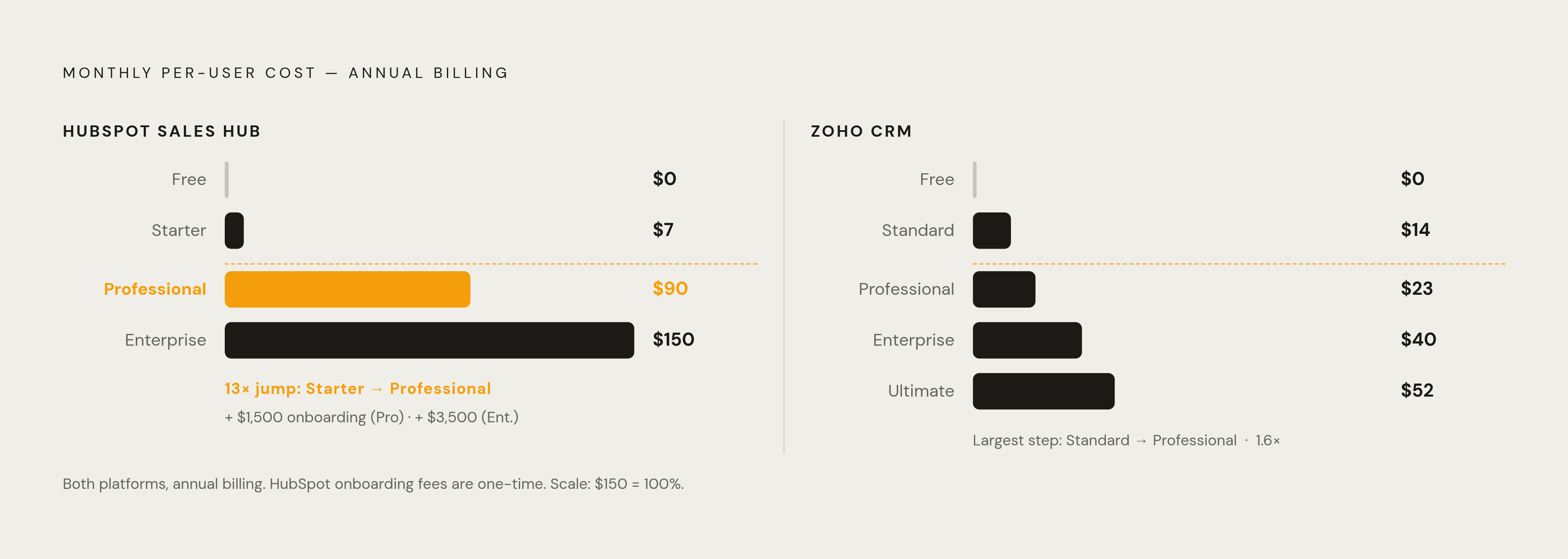
Zoho's pricing tiers are laid out clearly. With annual billing, Standard runs $14 each month per user, Professional $23, Enterprise $40 and Ultimate $52. Zoho has a free plan letting up to 3 people handle leads, contacts, and tasks, but it skips workflow automation depth and meaningful analytics.
HubSpot's Sales Hub price looks pretty straightforward until you check the details. Starter costs $7 a user each month annually, or $20 monthly without a deal; Professional jumps to $90 a user annually ($100 monthly) with a required one-time onboarding fee of $1,500; Enterprise runs $150 a user and a one-time $3,500 fee. HubSpot's free tier lets a pair of people manage 1,000 contacts, track deals, connect email integration, handle scheduling, and run reporting without entering a credit card, and it holds up fine for a small micro-team over a long stretch.
Buyers are often surprised by both figures in this case. Month-to-month on Starter runs about three times the annual price, and going from Starter to Professional jumps the per-seat cost roughly thirteen times before any onboarding fee kicks in. The onboarding fee comes first: HubSpot has six documented cost categories on top of the sticker price, implementation and training included, while CRM Suite Professional requires a one-time onboarding of $4,500 and Enterprise requires $12,000. The typical verified HubSpot deal runs $26,275 annually, but buyers can knock off 18% by haggling.
Zoho's price needs to be considered not only alongside HubSpot but also within the broader industry. Salesforce costs $25 each month per user; Microsoft Dynamics 365 charges $65 for each user monthly for sales functionality. Given that, Zoho's Standard tier at $14 looks closer to the market's real bottom than a discounted offer. For a business juggling multiple tools, Zoho One bundles its 50-plus Zoho apps for roughly $37 per user per month annually, and when marketing, support, and other software are stacked into the comparison, the idea that Zoho runs a few times cheaper at a comparable feature tier holds. Paying monthly means roughly $6–$13/user across tiers more, but annual billing cuts up to 34% versus monthly.
Where each platform leads and lags
HubSpot's user-friendliness is clearly its strong suit. Reviewers on G2 and Capterra say HubSpot's interface has the shortest onboarding in its class, and TechRadar's hands-on review described it as robust and intuitive. Zoho earns praise for customization and integration depth, but people say setup needs know-how, while one February 2026 Capterra review noted a cluttered interface and, for non-premium accounts, inconsistent support response times. In practice, Zoho works for a 5–30-person B2B sales team when someone willing handles admin work, but it punishes any group without that role.
Customization runs the opposite way. Zoho permits custom modules, like an Assets tracker or a Deliveries log, on pricing tiers far under where HubSpot gates the same custom objects behind its Enterprise plan. HubSpot's customization philosophy plays defense: lock down records, stop errors, and safeguard reporting. Zoho's approach leans permissive, molding the software around whatever the business asks for. With Zoho's Canvas feature, that permissiveness is clearest: an admin redesign can make the CRM resemble a property listing screen or a stripped-down sales dashboard, visual reshaping HubSpot's structured hub approach won't try to equal.
Marketing automation reveals the origin story best. HubSpot builds web assets, lead capture, email marketing, campaigns, blogging, and natively offers SEO recommendations in the same database as sales. Zoho handles marketing through its Zoho Campaigns integration, which runs fine yet still needs a sync, so cross-app reporting drags while records fill in.
Reporting flips the lead once more. HubSpot's dashboards stay unified and tidy, generating a Revenue and Marketing Campaign report after a few clicks, though customization has a lower ceiling. Zoho runs a complete BI engine underneath, offering analytics customization that can support SQL-level queries for precise trend work, but cross-app data must sync into the Analytics app before it's ready. For the ecosystem, Zoho lists 2,500 Marketplace extensions plus 800-plus third-party integrations, with users often staying inside Zoho; HubSpot lists 1,700 integrations, and business.com is citing more than 2,000 in a June 2026 update. A team tied to one ecosystem gets pulled along; a team straddling both runs into friction.
AI Access and Cost by Platform
HubSpot's AI layer, across hubs, drafts follow-up messages, summarizes discussions, and spots duplicate contacts without prompting. A Prospecting Agent draws on AI to find leads in stored records, while a Content Agent helps shape personalized outreach, plus intelligence for sales chats, predictive lead scoring, guided selling, and AI-powered sales forecasting. Even someone without technical skills can build their own AI agents through the Agent Builder. The philosophy is action: the AI takes on the work, not merely the guidance. HubSpot's ROI Report is vendor-authored, so treat it with that caveat, but it claims 76% of sales reps find HubSpot AI helps them sell more.
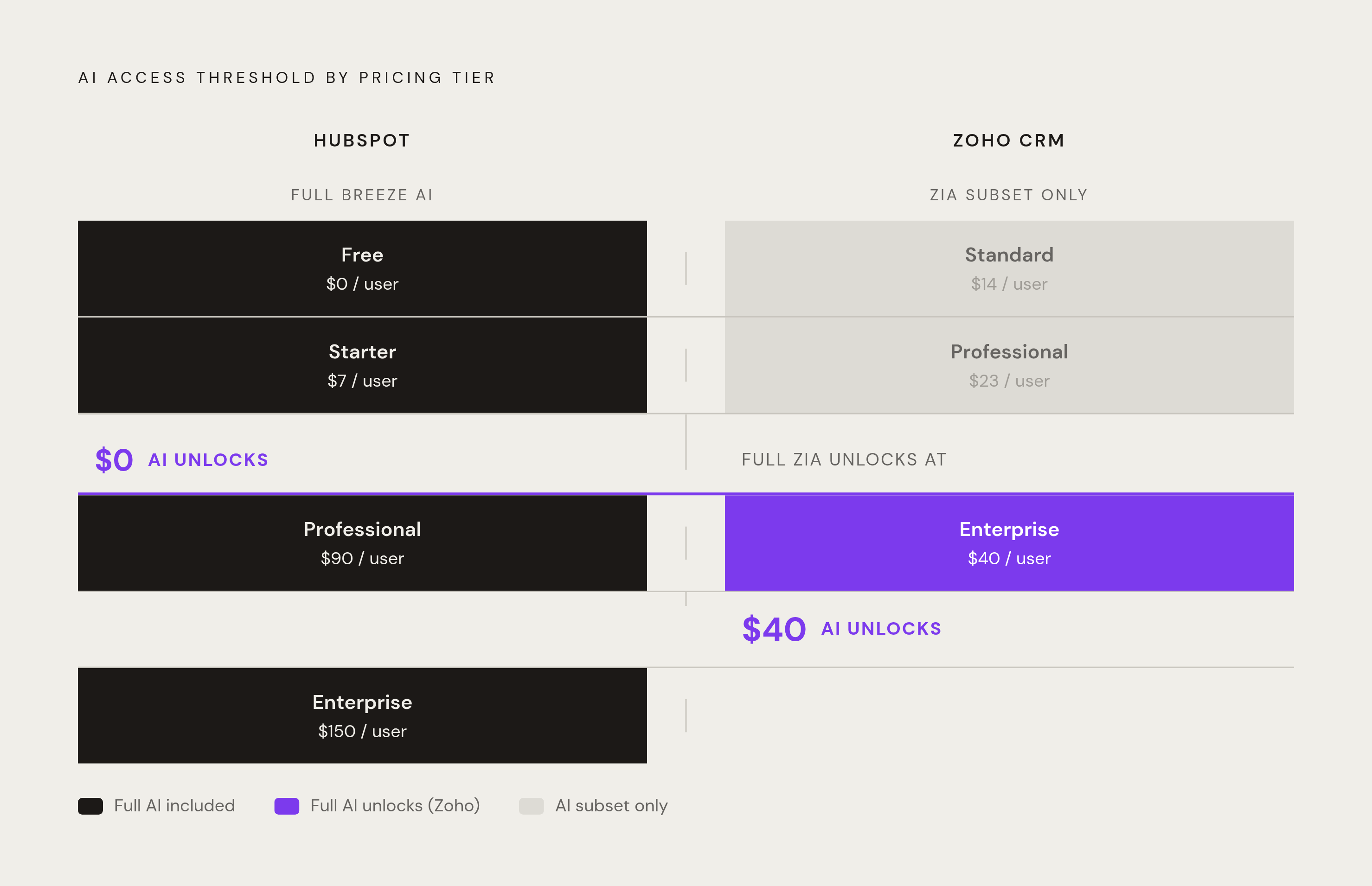
It runs lead scoring predictions, spots odd sales patterns, gives best-time-to-contact advice, and helps with data entry. Access counts more than the features themselves. Zia's complete feature set requires the Enterprise plan, billed at $40 per user each month on annual terms, while Standard and Professional accounts get just a bare subset. And Zia needs plenty of data to work well: a team handling under a few hundred entries per module will likely see poor results early on.
Forbes Advisor's review basically calls it even: both assistants handle manual input, set up workflows, and boost output, though people find HubSpot's tools "ever so slightly easier to use." What separates them on features is small. The platforms diverge here: HubSpot's AI comes in every tier, but Zoho's full AI runs only on the $40 Enterprise plan. That limit deserves a budget-constrained team’s weigh alongside any feature comparison. The AI philosophy leans execution-focused, letting the AI handle work for you.
Real user reports on support quality, satisfaction, and recurring complaints
Zoho CRM holds 6,964 verified Capterra reviews and a 4.3 score on March 13, 2026, while customization gets top praise, with one reviewer naming it the "customization champ. The flip side keeps coming back: G2 flags a noticeable portion of Zoho reviews as "Poor Customer Support," with a Quality of Support rating of 7.6, trailing HubSpot Sales Hub's 8.5. The same February 2026 Capterra review comes up again, citing a cluttered interface and inconsistent response times for users without a premium plan.
HubSpot's reviews consistently rate well for ease, while support across platforms makes support quality a recurring differentiator, never an afterthought. Zoho's support quality gets better with upper tiers, so teams on Standard or Professional lacking premium support should expect slower turnaround.
The pattern across both groups of reviews is nearly symmetrical. HubSpot's complaints tend to focus on prices climbing once a team moves beyond its first tier. Zoho's complaints cluster around difficult onboarding plus support responsiveness. Each platform's weak spot is roughly the flip of its own advantage.
The four team profiles that predict which platform will work
One example is a sub-10-person team without ops or a CRM admin, prioritizing speed-to-value. Marketing and sales fall to the same hands, and the team is genuinely willing to spend more for something that just works. HubSpot fits this profile. The free tier holds for a long time, Starter stays a low-risk entry at $7 per seat, and the platform's layout is meant to keep first-week confusion from happening. Plan ahead for the move to Professional, because automation and sequences will be required later and the price increase is steep.
Their sales process rarely lines up with a standard template, and they keep a tight grip on costs. Zoho works here. At $23 per user, Professional handles most team needs, custom modules arrive before the jump to Enterprise tier, and total cost stays far below HubSpot's for comparable depth of feature. Lose that one admin and their custom configuration stops being an asset, so documentation is never optional.
The third profile covers a marketing-led team whose needs sales and marketing efforts rely on identical information. They run inbound-heavy, using content and email campaigns to fill the pipeline, so sales needs marketing activity visible right away. HubSpot fits this team because its single database eliminates sync lag, puts a Revenue by Marketing Campaign report a few clicks away, and keeps Breeze's content help in one workflow. Zoho handles this too via Zoho Campaigns, but its integration and sync delays add friction that HubSpot avoided from day one.
This team needs CRM, support, tools, and other operational systems, but the total software constraint is a key factor, and it either has or can bring in the right expertise. Zoho fits this case, and fits well: Zoho One bundles 50 applications and more at roughly $37 monthly per user, while the total cost difference against assembling similar HubSpot hubs with third-party add-ons is big. Most small and mid-sized firms in the 10-to-100 range get a lower total cost from Zoho at a comparable feature tier, and it isn't marginal: the savings compound every year the stack stays up. The cost-aware team of 10–100 employees setting up a complete business operating stack is 4.
The questions a small business team should answer before choosing
Before anything else, figure this out: who on the team will take charge of CRM configuration and upkeep? If the truth is no, that flexibility from Zoho's becomes something unfinished, not an asset, however appealing the tier price looks.
From there, the diagnostic shifts to specifics. How much does the team weigh price now against the cost of moving after thirty reps have habits around whichever platform takes hold? Does the sales process follow the standard, or do quirks (approvals across multiple stages, tracking of unusual assets, pipelines that don't run in a straight line) leave the team wrestling a rigid tool daily? Is marketing tightly coupled with sales, trading campaign leads as it works, or could a sync delay between tools go unnoticed?
There is no universally right choice here, and that is the whole idea.
Sources
- HubSpot vs Zoho | Sales Software Comparison Guide
- HubSpot vs Zoho Comparison 2026
- HubSpot vs Zoho CRM: Which CRM Is Right for Your Small ...
- HubSpot vs Zoho CRM (2026): Which Is Best for Small Business? - DecisionCircuit
- Zoho CRM Pricing: Complete Guide to Plans and Costs (2026) - Zeeg
- Zoho Pricing Guide (2026) - Zenatta Consulting
- HubSpot Pricing 2026: Full Guide to Selecting the Right Plan
- Zoho CRM Pricing 2026: Free Plan, Costs & Full Feature Breakdown