CRM Data Migration Risks and How to Avoid Them
Five preventable failure modes cause most CRM migrations to derail.

CRM data migration is the process of moving customer records, deal history, and years of accumulated business logic from one system to another, and it fails far more often than the vendors selling you the new platform will admit. Only a quarter of CRM implementations hit their planned scope, timeline, and budget all at once, according to the Johnny Grow 2025 CRM Failure Report. This piece walks through why: not because migration is mysterious, but because the same five or six failure modes show up in nearly every project, and most of them are preventable if you know to look for them before they happen instead of after.
What a CRM data migration actually involves — and where the complexity hides
Here's the thing people get wrong before they even start: migration is not "moving data." It's an ETL process, extract, transform, load, and each of those three verbs hides its own way to lose sleep. You pull data out of the old system, reshape it to fit the new one's schema, then load it in. Simple to say, brutal to execute.
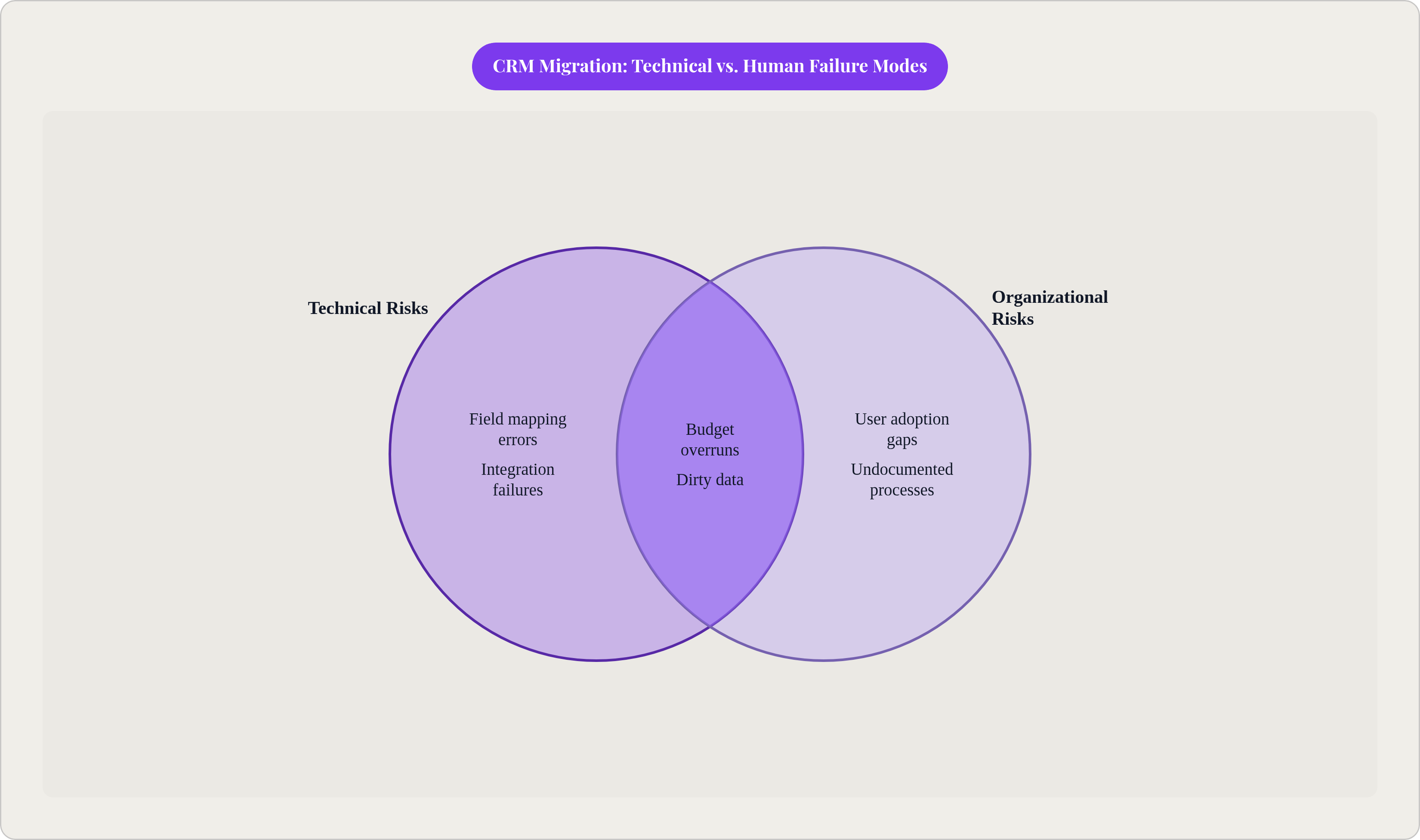
CRM data is relational by nature. A deal is tied to a contact, the contact is tied to a company, the company is tied to a string of activities and email threads and support tickets. Export that to a CSV and you flatten it, rows and columns, and the associations that made the data useful in the first place just quietly disappear. Nobody sends you an error message when that happens. It just happens.
What's actually moving in a typical migration: contact and account records, deal history, custom fields, activity logs, marketing consent flags, integration configurations, reporting baselines. And of that list, custom fields are usually the ugliest problem, because they encode years of business logic that exists nowhere else in writing. Nobody remembers why "Lead Score V2" calculates the way it does; they just know sales ops built it in 2019 and everything downstream depends on it.
Add in the fact that a CRM migration touches every connected system, marketing automation, support platforms, accounting, email, reporting, and you start to see why the average mid-market migration takes three to six months. That's not bureaucratic padding. That's how long it actually takes to find all the tripwires.
Data loss and corruption: the highest-impact risk and how it happens silently
More than 28% of migration projects in 2024 experienced data loss, corruption, or a compliance violation somewhere along the way. That's not a rare edge case; that's more than one in four.
Loss happens quietly, and that's what makes it dangerous. A network interruption drops a batch of records mid-transfer with no error thrown. Incompatible field formats choke during transformation. Relational links snap when data gets flattened for export, the same problem from the last section, just showing up again at a different stage. And historical engagement data, old email threads, call logs, deal timelines, gets excluded from standard exports more often than teams expect, because nobody thought to ask if it was in scope.
The compounding part is what should worry you. A 2% data loss doesn't sound like much until you realize it can distort your entire customer segmentation model, which means misdirected campaigns and sales forecasts built on sand. Corruption is worse than loss in one specific way: a lost record is obviously missing, but a corrupted record looks present and just behaves wrong. Broken associations. Garbled field values. A deal linked to the wrong account. It sits there looking fine until someone runs a report and the numbers don't add up.
So what actually prevents this? Run a full export and record count before any transformation touches the data, so you have a baseline to check against later. Use checksum or hash verification at each stage of the ETL pipeline; it catches silent drops that nobody would otherwise notice until a customer complains. Map every relational object explicitly, not just the primary record types like contacts and deals. Confirm, in writing, that historical activity data is actually in scope, don't assume it. And run a pilot migration on a representative sample before you touch the full dataset. It's tedious. It's also the difference between finding a problem on 200 test records and finding it on 200,000 live ones.
Dirty data that existed before the migration — and how it spreads in the new system
Here's an uncomfortable fact: your CRM data was probably already a mess before migration ever entered the conversation. Salesforce's own research puts the incomplete-data rate at 91% across CRM systems generally, meaning most teams are migrating a compromised dataset and just haven't audited it closely enough to know.
Once organizations actually run a proper audit, they typically find 30 to 50% of records are duplicates, outdated, or missing required fields. Deduplication processes alone tend to surface 10 to 30% duplicate rates, and anything above 10% is already actively dragging down sales operations, before anyone's even talked about migrating anything.
The part that catches teams off guard: bad data doesn't stay in its lane. A duplicate contact in the old system doesn't just move over as one duplicate; it becomes two separate records in the new system, each with its own history, its own owner, its own version of the truth, and no easy way to tell which one is right. Add in format inconsistencies, mixed date locales, currencies with no ISO code attached, phone numbers missing country prefixes, and you get validation errors and routing failures that look like new bugs but are really just old sins showing up in a new house.
The fix isn't glamorous. Audit before you plan, not during. Deduplicate and standardize formats in the source system first, before anything transfers. Define what a "minimum viable record" actually looks like, what fields have to be populated for a contact or deal to be worth migrating at all. And here's the reframe worth sitting with: migration is the deadline that finally forces the data quality initiative your team should have run two years ago anyway. Might as well use it that way.
Field mapping errors: how data ends up in the wrong place — or nowhere
Up to 40% of CRM migrations run into real trouble because of poor data quality, weak mapping, or testing that came too late to matter, per SyncMatters' analysis of migration failures.
The core issue is almost linguistic. Fields with the same name mean different things across two systems. Fields with different names sometimes mean the exact same thing. And custom fields built up over years in the old platform often have no equivalent at all in the new one's data model. The failure mode that should worry you most is the silent kind: "Username" in the source system maps to "Account" in the target, the data transfers cleanly, no error fires, and it's just sitting in the wrong field, quietly corrupting every report that touches it downstream.
Testing usually catches these problems, but late, and late is expensive. Fixing a mapping error after go-live means fixing it in a live system full of live users, which is a different animal entirely from fixing it in a sandbox.
Build a full field inventory for both systems before any actual migration work starts. For every field, document the mapping decision explicitly: source field, target field, transformation rule, and who owns that decision. For custom fields with no direct match, decide upfront whether you're building a new field, merging into an existing one, or archiving it and leaving it behind. Validate the results after your pilot run by spot-checking actual records across different object types, not just confirming the row counts matched. And bring in the people who use the data daily, sales ops, marketing, not just IT. IT knows the schema. Sales ops knows what "Lead Score V2" is actually for.
Downtime and business continuity: how a cutover window becomes a crisis
A cutover window is the single most dangerous stretch of the whole project, and it's also the shortest. That's not a coincidence; it's the moment table relationships are most likely to snap and transaction history is most likely to go half-missing, precisely because it's the moment the old system is off and the new one isn't yet verified.
A poorly timed cutover can leave a sales team staring at a blank pipeline for hours, sometimes days. And that's not a hypothetical inconvenience: operational downtime from inaccessible or corrupted data costs enterprises real money per hour in lost productivity and missed deals.
Time the cutover around the business calendar, not the vendor's calendar. Don't do it during quarter-end, don't do it during a major campaign launch. Define your rollback procedure before go-live, not while you're mid-crisis wondering what the path back even is. Run both systems in parallel for a defined stretch so users can flag discrepancies without losing access to anything. Tell every affected team about the window well in advance, not the morning of. And consider a phased migration, by region, by team, by data type, because migrating everything at once means any single failure has the widest possible blast radius.
A deal is tied to a contact, the contact is tied to a company, the company is tied to a string of activities and email threads and support tickets.
Integration failures: the connected systems that break when the CRM moves
A CRM never operates alone. It's wired into marketing automation, support platforms, accounting, email, the website, reporting dashboards, sometimes an ERP or a payment processor. Each of those connections has its own dependencies, and none of them care that you're in the middle of a migration.
Skip the integration review and things break quietly: lead routing stops firing, revenue data stops reaching finance, support tickets lose all customer context the moment they're opened. For companies with logistics or payment integrations, the fallout is immediate and visible, inventory the new CRM can't see, payments that don't route where they're supposed to. Technical debt from integration complexity is a big reason 21% of enterprises ended up delaying or abandoning migration projects outright in 2024.
Audit every connected system before you plan anything else; build an actual dependency map, not a mental one. For each integration, figure out whether the new CRM supports it natively, needs a new connector, or requires a rebuild from scratch. Test every integration in a sandbox before cutover, because a connection that worked fine in the old system is not guaranteed to work in the new one just because the vendor's marketing page says "integrates with everything." And prioritize by revenue impact: fix the payment and pipeline integrations first, worry about the secondary marketing tool connections later.
Compliance and security exposure during the transfer window
Data is most exposed while it's moving, and that's exactly what a migration is: weeks of data in transit and temporary storage, creating a compliance window that a company with a spotless security record would otherwise never face.
GDPR Article 35 actually calls out data migration by name as a case where a Data Protection Impact Assessment is appropriate, because moving personal data between systems is explicitly the kind of high-risk processing the regulation is worried about. That's not abstract risk. GDPR fines can reach €20 million or 4% of global annual turnover, whichever number is bigger, and cumulative enforcement has climbed to €5.88 billion since 2018, with €1.2 billion of that landing in 2024 alone.
Consent is the detail that trips people up most. If marketing consent flags don't transfer cleanly into the new system, your shiny new CRM's outreach lists are non-compliant from the moment it goes live, even though nothing "went wrong" in the technical sense. Failing to enforce data minimization, migrating fields that had no business being migrated, failing to honor deletion requests, failing to keep an audit trail: all of that creates exposure under GDPR, HIPAA, CCPA, and SOC 2 simultaneously.
Run the DPIA before migration starts, not as a retroactive paperwork exercise. Encrypt data in transit and at rest, and check the target system's encryption standards before you've already signed the contract, not after. Treat consent records as a first-class object in the migration plan, confirm the consent field exists and maps correctly, don't treat it as metadata that'll probably be fine. Purge the records of anyone who's exercised their deletion rights before the migration, not after. Keep a full audit trail of what moved, when, and who touched it; it's a compliance requirement, and it also happens to be the best debugging tool you'll have when something goes sideways later.
User adoption: the risk that doesn't show up in the migration report
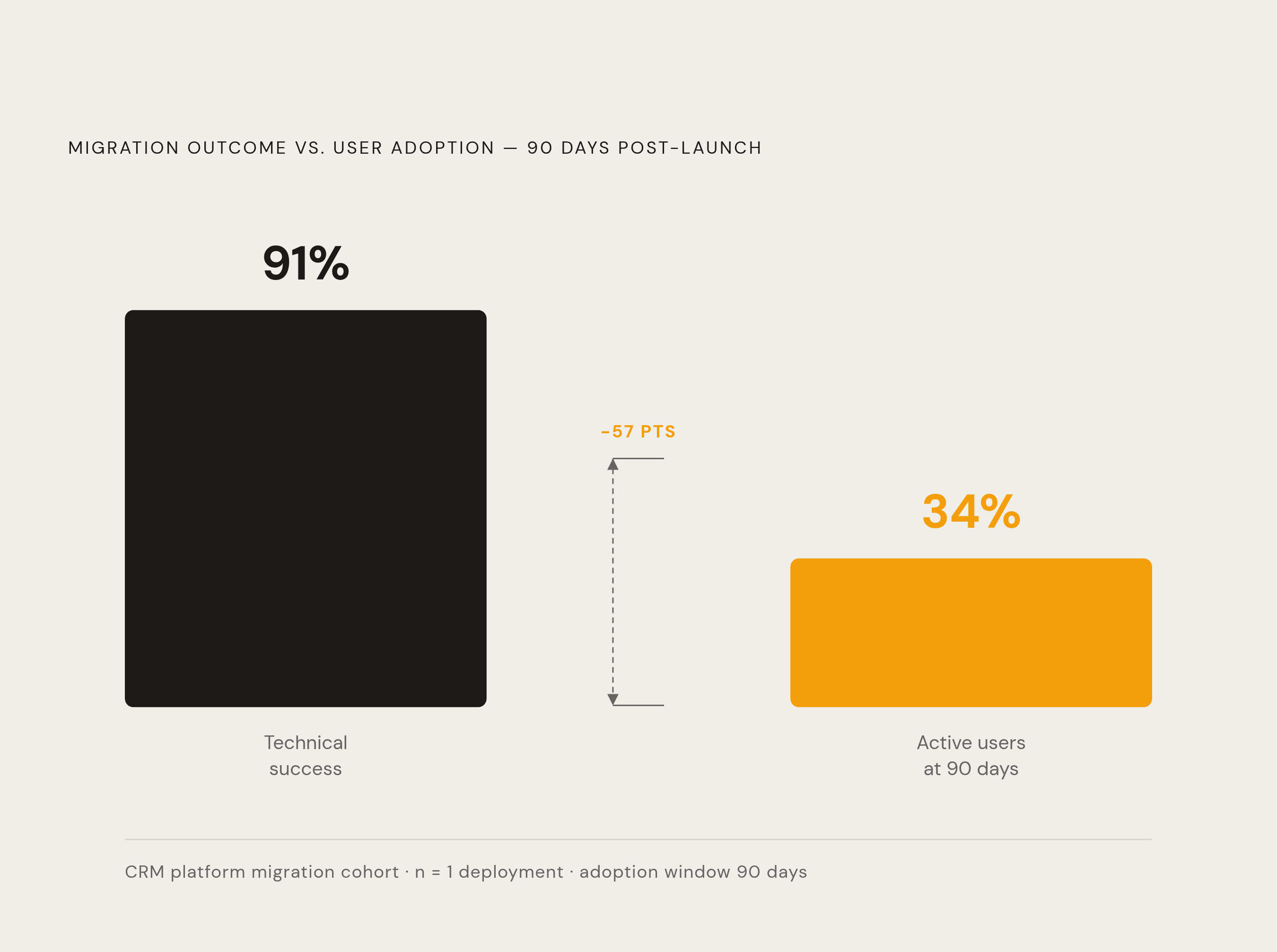
Here's the split that should bother every project lead: in documented cases, migration succeeded technically 91% of the time, data moved, systems connected, but only 34% of users were still actively using the new CRM 90 days later. The data arrived. The people didn't follow.
Only about 10% of CRM implementation failures trace back to technical problems. The rest is people and process, full stop. A 47% adoption failure rate is linked directly to a lack of ongoing support after go-live, and sales teams working in an unfamiliar system commonly see efficiency drop 20 to 40% for two to three months, a real revenue hit stacked right on top of the migration's own cost. Part of the problem is structural: 43% of CIOs named a shortage of skilled migration professionals as a key challenge in 2024, and that same skills gap shows up again in the training that's supposed to follow.
Bring frontline users, sales reps, marketing managers, support staff, into the plan from day one. If they don't understand why the system changed, they'll build workarounds in Excel and call it a day. Designate champions on each team, train them early, let them become the peer resource people actually ask instead of filing a ticket. Build a 90-day adoption plan with real structure: training sessions, office hours, a feedback loop on data quality, usage metrics you actually check. And measure adoption directly, active users, data entry rates, workflow completion, not just whether the migration finished on schedule. A migration that finished on time and got abandoned by the sales team isn't a success story; it's a slower failure.
Budget and timeline overruns: why CRM migrations routinely cost more than planned
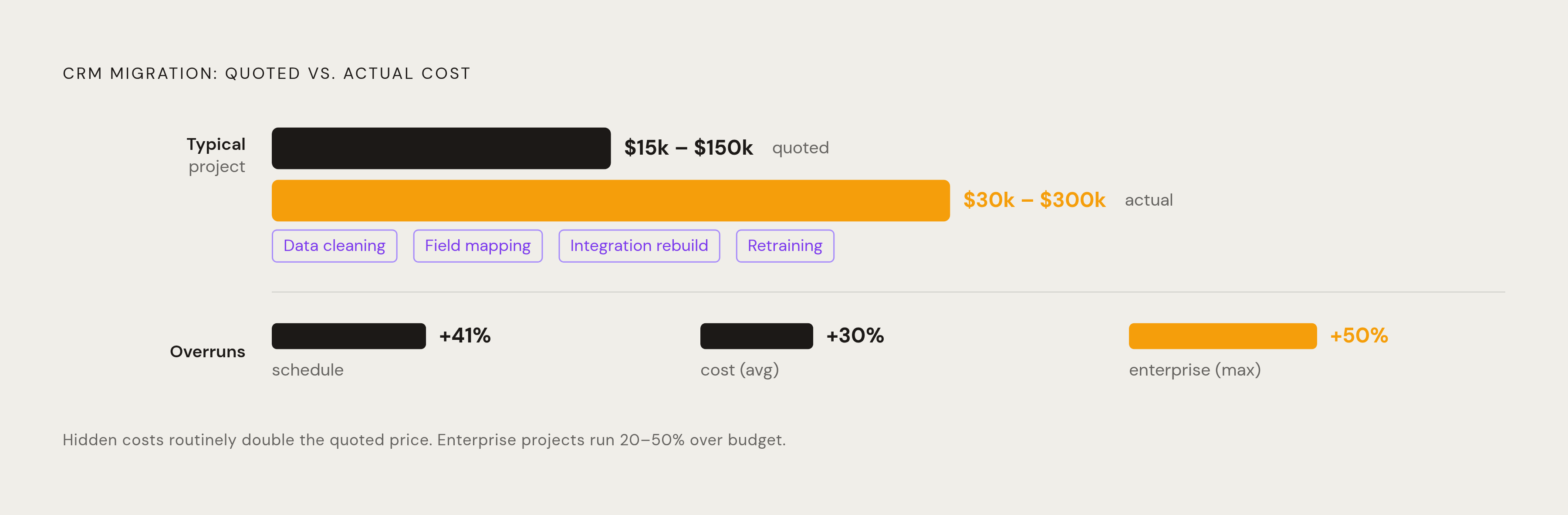
Bloor Research puts average cost overruns on data migration projects at roughly 30%, with schedule slippage averaging around 41%. Enterprise projects commonly run 20 to 50% over budget, mostly because previously undocumented business processes surface mid-project and nobody scoped them in.
The sticker price is almost never the real price. A typical CRM migration runs somewhere between $15,000 and $150,000 depending on data complexity and company size, but hidden costs routinely double that initial number. What gets missed: the labor of actually cleaning data, the time spent on custom field mapping, rebuilding integrations, retraining the team, none of which show up as a line item on the platform's licensing quote, because the platform vendor isn't the one doing that work.
And here's the part that ties every earlier section together: every risk this piece has walked through has a price tag attached to it. Deduplication work costs money. DPIA preparation costs time. Integration rebuilding costs both. Adoption programs cost money too, just later, and usually at a worse exchange rate than if you'd budgeted for them up front. Teams that skip these steps don't avoid the cost; they just defer it, with interest.
Build your budget from an actual work breakdown structure, not from the platform's list price. Estimate data prep, field mapping, integration work, training, and a contingency buffer as separate line items, because they are separate problems, and pretending otherwise is exactly how a modest migration budget turns into a much larger one by the time anyone notices.
Sources
- https://medium.com/@kanerika/top-10-data-migration-risks-and-how-to-avoid-them-in-2025-bcee5b2fda0c
Provided the figure on how even a small data loss percentage compounds into larger downstream problems.
- https://www.marketreportsworld.com/market-reports/data-migration-market-14721629
Provided the 2024 statistics on migration projects experiencing data loss or compliance violations, and the percentage of enterprises that delayed or abandoned migrations due to integration complexity.