CRM Automation Tools for Growing Teams
Reps waste two-thirds of their time on admin work—here's what automation actually fixes.
Here is an uncomfortable number: sales reps at growing companies spend only 34% of their time actually selling, according to 2025 research. The other 66% dissolves into call logging, lead chasing, and maintaining whatever spreadsheet someone "just needs for reporting." At ten people, that waste is a nuisance. At twenty-five, it is a revenue problem.
The inflection point arrives without announcement. A team that managed its pipeline in a basic CRM or a shared spreadsheet reaches a volume where the manual process stops being a quirky artifact of startup culture and becomes a structural liability. Leads fall through handoff gaps. Follow-up sequences depend on individual rep discipline, which is to say they are inconsistent. Every missed touchpoint compounds across a growing pipeline. A pipeline without automation is like a leaky bucket — you can keep filling it, but you will struggle to get ahead of the drip.
That raises an important question: why do so many growing teams still treat this as a tool problem when it is really a process problem expressed through tools? Because 84% of companies evaluating CRM software have fewer than 1,000 employees, a segment where platforms like Letterstory, an end-to-end content marketing platform built for teams without agency budgets, also operate, this is not a fringe situation. These teams occupy an awkward middle ground: too complex for no-tool approaches, not large enough to absorb the implementation overhead and IT dependency that enterprise CRM demands.
What follows is an attempt to map the automation capabilities that actually matter at this stage, and the tools that deliver them, without requiring a six-figure implementation budget or a developer on retainer.
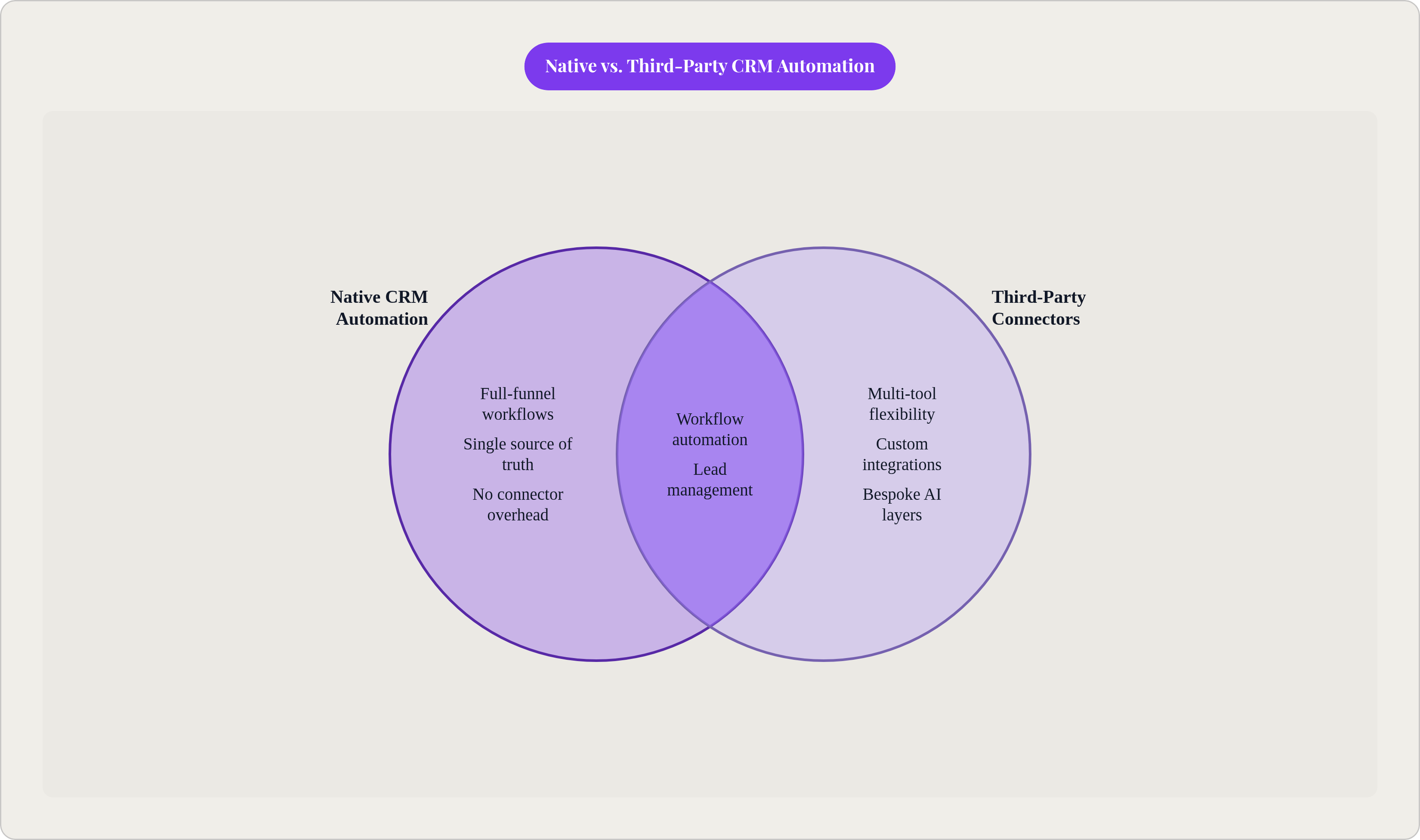
One distinction worth establishing before anything else: native automation, built directly into the CRM, versus automation assembled through third-party connectors. At this team size, native tends to win in most cases. A growing team does not need Zapier gluing together five tools when one platform handles the workflow internally. Keep that in mind as the tool comparison comes later.
The Automations That Pay Back Before the Others
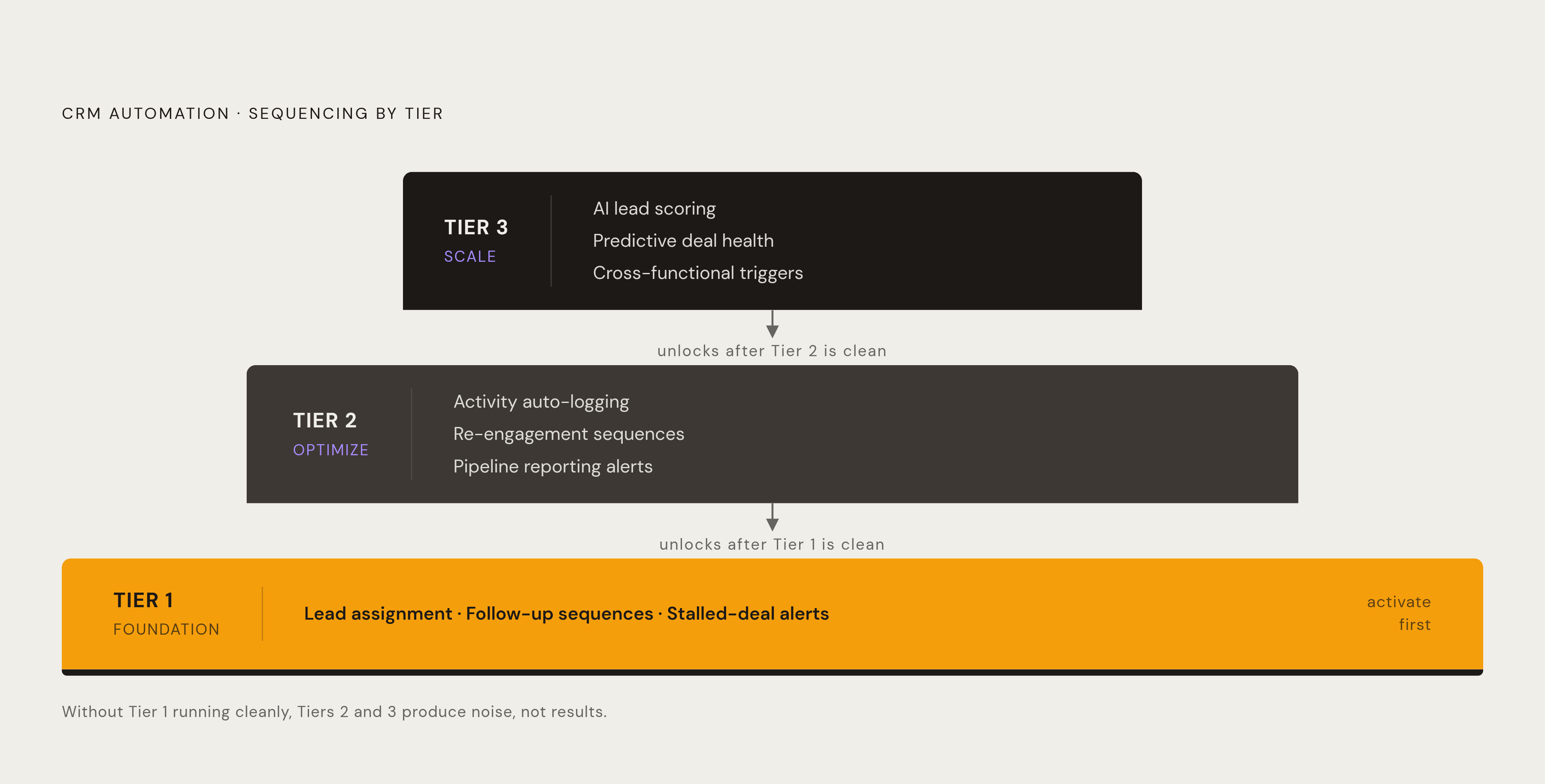
Not all automation delivers equal return, and the sequencing matters more than most implementation guides will admit.
The highest-return, lowest-complexity automations to activate first: (i) automated lead assignment, which eliminates the handoff delay that lets inbound leads go cold; (ii) follow-up sequences on new leads, which make outreach consistent without relying on individual rep memory; and (iii) deal stage automation, specifically auto-creating tasks or sending alerts when a deal has not moved in a defined number of days. That last one catches stalled deals before they fall out of the pipeline entirely. In my experience, that is where most growing teams bleed the most, quietly, over months, before anyone runs the numbers.
Once those are running cleanly, the second tier becomes accessible: (i) activity auto-logging, which removes the biggest source of CRM data rot; (ii) re-engagement sequences for leads that went cold; and (iii) pipeline reporting alerts for managers. The third tier, (i) AI lead scoring, (ii) predictive deal health, and (iii) cross-functional triggers that fire a customer success workflow from a CRM event, is worth adding as your team scales. It is not a day-one priority.
Reps who adopt even basic CRM automation reclaim five to six hours per week from manual updates. The more instructive question is not what they save but what they do with that time. That reframing lands differently in a room full of skeptical founders.
One practical caution: implement one tier before adding the next. Teams that automate everything at once end up with workflows nobody trusts because the underlying data is still dirty. Garbage in, automated garbage out. That phrase sounds obvious until you have watched a team of twenty-two people spend three weeks chasing leads that were already closed. It is the CRM equivalent of mopping the floor while the faucet is still running.
How the Leading CRM Tools Handle Automation for Growing Teams
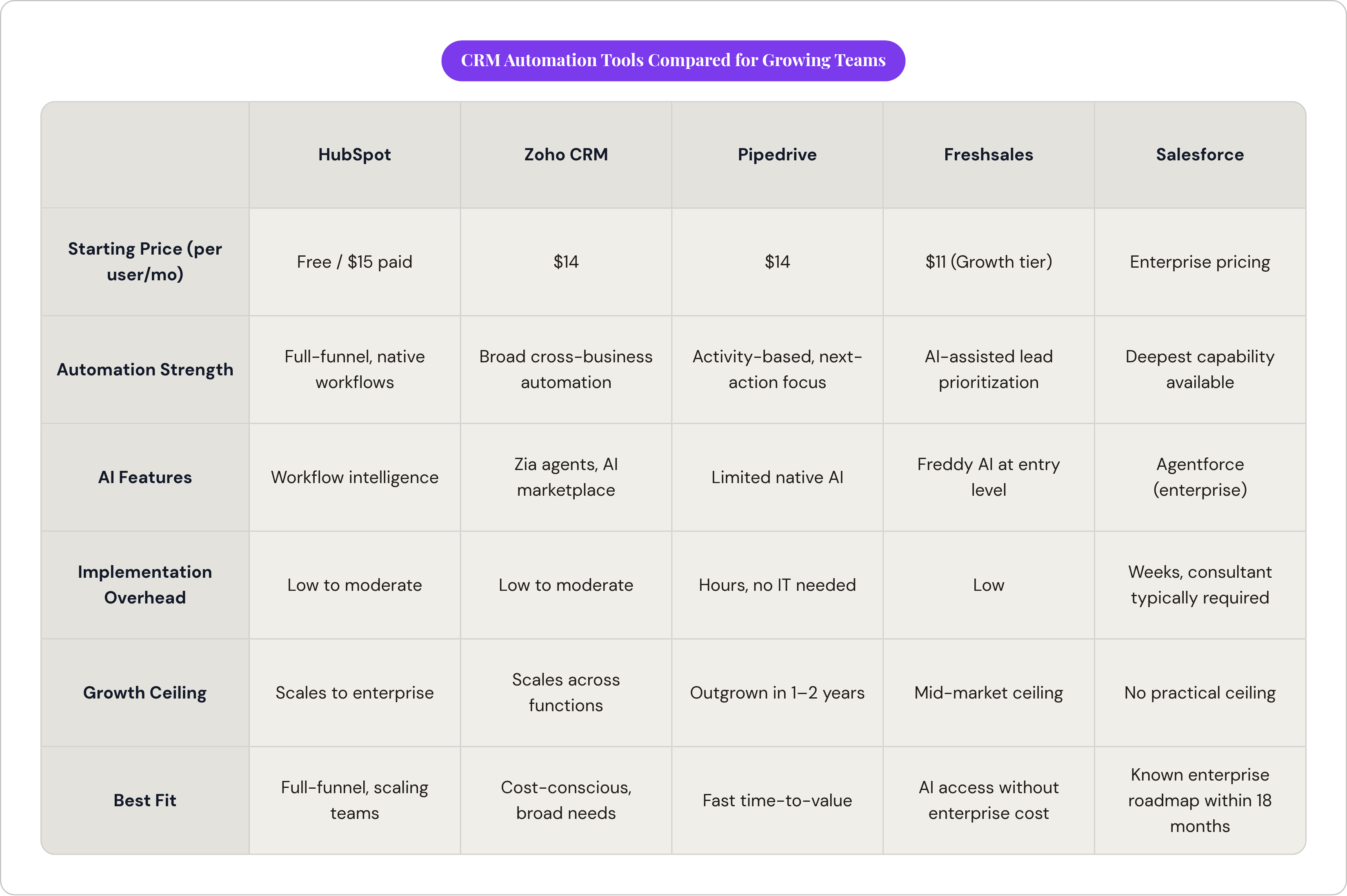
No single tool wins across every situation. The right choice depends on current team size, existing tech stack, and where the ceiling needs to be. What follows is an honest look at how the primary options perform for growing teams, with no pretense that any of them are universally correct.
HubSpot
HubSpot is a dominant choice in the SMB and mid-market segments. Its 299,458 paying customers as of March 2026, up 16% year-over-year, reflects genuine adoption at this team size. The free plan gets teams started; paid plans begin at $15 per user per month.
Its native automation strength is full-funnel coverage: workflows that connect marketing, sales, and service without requiring third-party connectors, which matters enormously for teams that want a single source of truth without building integrations themselves. For teams that want automation across the funnel and expect to grow into more sophisticated use cases, HubSpot earns serious consideration.
The caveat that vendors rarely volunteer: costs escalate meaningfully at higher tiers. Model the pricing at twice your current headcount before you commit. I have seen this catch more than one ops lead off guard at renewal.
Zoho CRM
Zoho starts at $14 per user per month. The breadth of the Zoho ecosystem means automation can extend beyond CRM into finance, HR, and support without leaving the platform, which matters for leaner teams that cannot afford to manage a sprawling tool stack. In 2025, Zoho introduced AI agents and a Zia Agent Marketplace, relevant for teams that want to experiment with AI-assisted automation without enterprise pricing. Gartner named Zoho a Visionary in its Magic Quadrant for Sales Force Automation Platforms in July 2025.
Best fit: cost-conscious teams that want broad automation across business functions, not just sales.
Pipedrive
Pipedrive's activity-based selling methodology is baked into the product architecture. Automation focuses on surfacing the next action rather than managing complex deal stage logic, which is both its strength and its limitation. Setup takes hours rather than weeks, and pricing ranges from $14 to $99 per user per month without requiring IT involvement.
The ceiling is real: growing companies frequently outgrow Pipedrive within one to two years and migrate to a more comprehensive platform. That is a transparent tradeoff, not a disqualifier, but it should factor into the evaluation if enterprise-level customization is anywhere on the near-term roadmap.
Best fit: teams prioritizing fast time-to-value and simple pipeline automation, with a willingness to reassess as complexity grows.
Freshsales
Freshsales' Freddy AI assistant scores leads, forecasts deals, and suggests next-best actions, with AI capabilities available at entry-level and free tiers. The growth tier is priced at $11 per user per month.
Best fit: teams that want AI-assisted lead prioritization without paying for an enterprise platform to access it.
Salesforce
Salesforce holds the largest share of CRM software revenue globally. The depth of automation capability is unmatched. So is the implementation overhead. Implementation typically takes weeks with a consultant, and costs can reach into the tens of thousands depending on complexity. For most growing teams, that is the wrong choice today.
Best fit: teams that know they will need enterprise-grade customization within twelve to eighteen months and are building toward that infrastructure deliberately, not teams still figuring out their sales process.
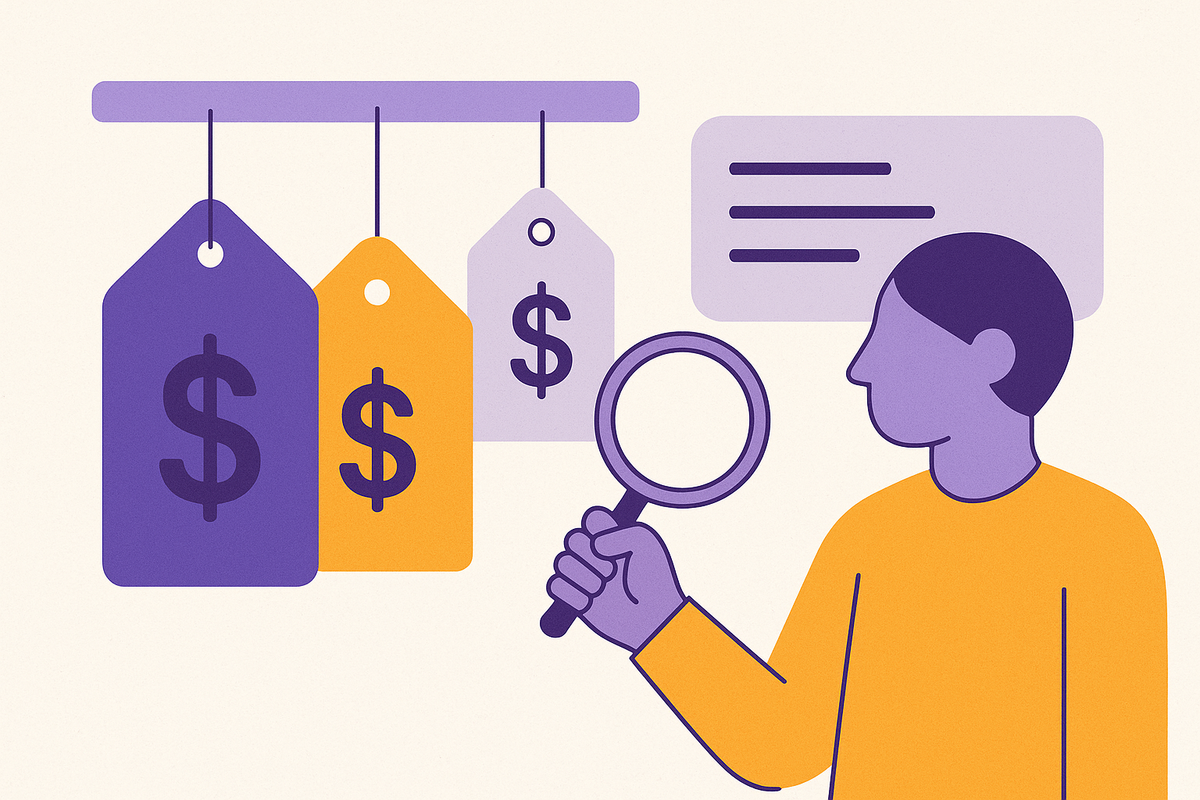
A pricing reality check: for a ten-person sales team, annual CRM spend ranges from zero on a free plan to roughly $43,200 at the Salesforce enterprise tier. That gap should shape the evaluation before a single demo is scheduled.
What the ROI Case Actually Looks Like for Automation at This Scale
CRM software delivers an average of $8.71 for every $1 spent. But what actually earns that return at the growing-team stage, and how much is accessible without a complex implementation?
The accessible levers are three: (i) conversion lift, (ii) retention, and (iii) rep productivity. Businesses using CRM automation report 17% higher lead conversions, per DemandSage. At growing-team volumes, even modest conversion improvement compounds across a larger pipeline faster than most teams expect. CRM-using businesses also see roughly 27% higher customer retention; for teams where each customer relationship materially affects revenue, this is where automation pays back in ways that are easy to overlook until a renewal cycle hits. Automation drives a 21% increase in agent productivity as well. Translate that not as a cost saving but as capacity gained without headcount added, and the internal business case becomes considerably easier to make to a CFO who is already nervous about software spend.
None of these returns require expensive customization, long implementation cycles, or a dedicated RevOps function. They come from activating the core automations already outlined.
But here is the part most ROI analyses bury: none of it materializes if adoption is low. A CRM that reps do not use delivers none of the above. Adoption is as much a configuration and change management problem as a tool selection problem, which is why the final section of this piece matters at least as much as the tool comparison.
Where AI Fits into CRM Automation for Teams That Aren't Enterprises Yet
The AI-in-CRM market is already a multibillion-dollar segment and growing fast, but most of that investment has concentrated at the enterprise end. The more useful question for a growing team is which AI capabilities have genuinely become accessible at non-enterprise price points.
The ones usable today: lead scoring, available in Freshsales' entry-level tiers and Zoho's mid-range plans, surfaces which leads to prioritize without requiring a data science function; email and sequence suggestions reduce the cognitive load on reps managing large outreach volumes; deal health alerts flag stalled deals based on activity patterns rather than rep intuition; and conversation intelligence, which auto-summarizes calls and pulls action items, directly attacks that 66% non-selling time figure.
65% of businesses have already adopted AI-driven CRM features such as chatbots, predictive analytics, and automated content creation. AI is not a future consideration; it is a current vendor differentiator. But you should be cautious about two specific failure modes. First, AI lead scoring requires enough historical data to be meaningful. A team with thin CRM history will tend to get noisy, unreliable outputs, which can be worse than no scoring at all because it misdirects rep effort in ways that are hard to detect until pipeline suffers. Second, agentic AI, systems that act autonomously on behalf of reps, is maturing fast at the enterprise level. Salesforce's Agentforce roadmap signals where the market is heading. But autonomous agents require governance infrastructure most growing teams simply do not have yet.
76% of companies now opt for pre-built AI solutions rather than building custom ones. For your team, this validates a straightforward approach: use what is native to your CRM rather than assembling bespoke AI layers on top of it. The teams that extract the most value from AI in CRM share one unglamorous characteristic: their underlying data was clean and complete before the AI touched it.
Evaluate AI as a feature within the CRM under consideration, not as a separate purchasing decision. The teams that treat it otherwise tend to end up with impressive demos and mediocre outputs.
How to Implement CRM Automation Without Creating a System Nobody Uses
The most common failure mode is not tool selection. It is adoption. A team selects a capable platform, configures ambitious workflows, and finds six months later that reps have reverted to their own spreadsheets and email threads. Not because the tool was wrong, but because adoption was treated as a deployment task rather than an ongoing management responsibility. I have watched this happen at companies with genuinely good tools and genuinely indifferent rollouts.
The implementation principles that hold regardless of which platform is chosen: start with one workflow, not fifteen. Pick the highest-friction manual step, automate it, and prove the value before expanding. Configure for how reps actually work, not how the playbook says they should. Automation that fights existing habits tends to get turned off; automation that removes friction from existing habits tends to get used. Clean the data before automating, because automated workflows built on dirty data do not improve outcomes. They scale the errors faster. Assign a single owner, someone on the revenue or sales ops side who is accountable for CRM configuration and can adjust workflows as the process evolves.
Why exactly does the manager's behavior matter so much here? Because CRM adoption correlates directly with it. If the manager pulls data from the CRM in one-on-ones and pipeline reviews, reps keep it updated. If the manager works around it, the team tends to follow. 61% of over-performing sales leaders use CRM tools to automate parts of their sales process. The causality runs in both directions: better leaders choose better tools, and better tools surface the data that makes managing easier.
The argument that the right tool selection makes adoption inevitable does not survive contact with a twenty-person sales team where the top rep has been doing things their own way for three years and sees no reason to stop. The tool is a prerequisite. The management layer is what makes it work.
The teams that get this right share one characteristic: they pick a platform that matches their current complexity rather than their aspirational one, activate the three or four automations that address their most acute pain, and expand from there. The ones that struggle tend to do the opposite. They buy for where they want to be in two years, configure for a process they do not yet have, and watch adoption crater before the first quarter is out.
Start small. Prove it. Build from there.