CRM Evaluation Criteria for Non-Technical Buyers
Most CRM failures stem from poor adoption, not technical shortcomings—so evaluate accordingly.
CRM failure rates sit somewhere between 50% and 63%, depending on whose research you read. Near-universal purchase, coin-flip success — something in the buying process is badly broken.
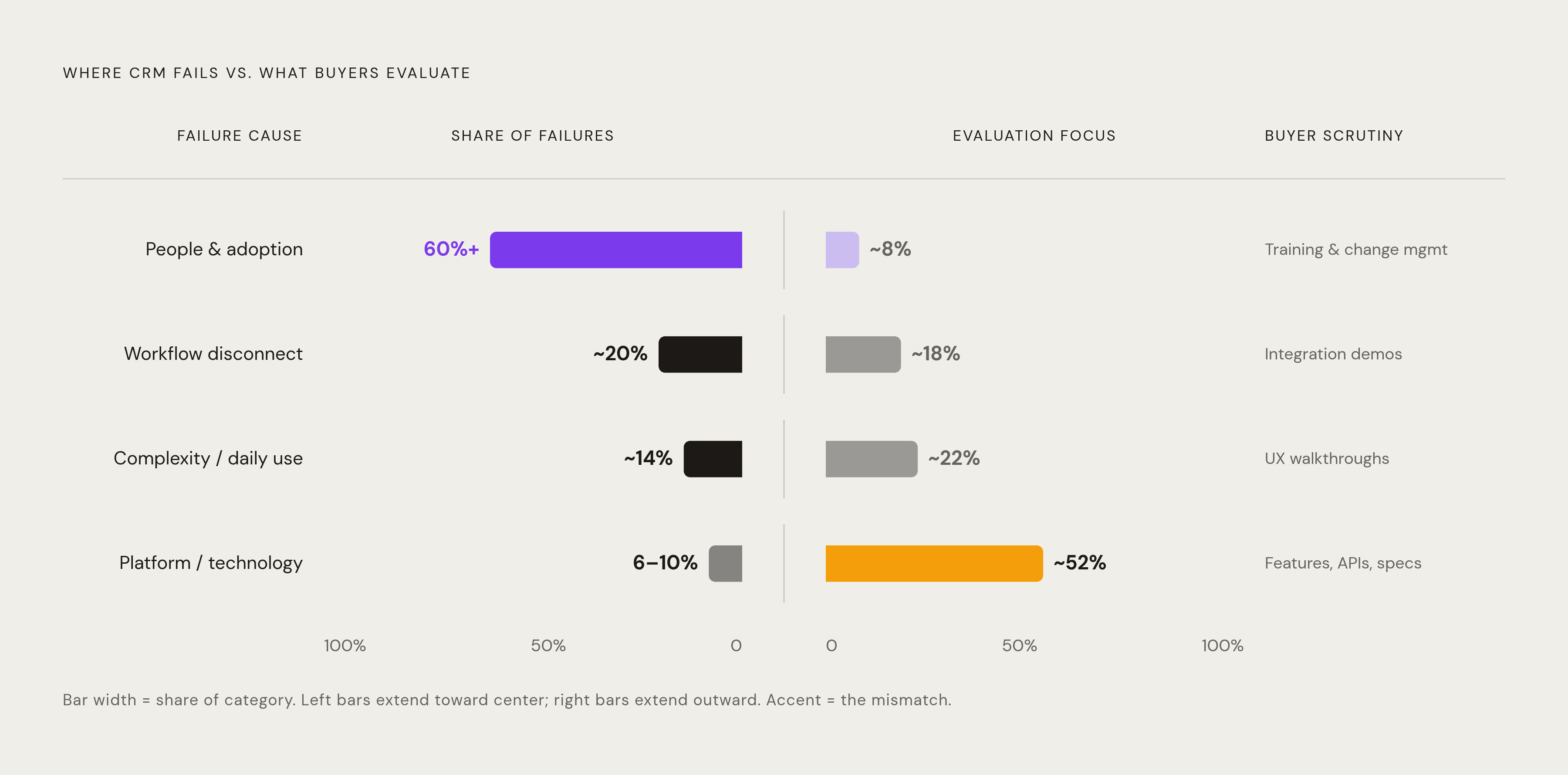
Here's the part that inverts the conventional framing: over 60% of CRM failures trace back to people-related challenges, while the platform itself accounts for somewhere between 6% and 10% of failures. So the technical evaluation criteria that dominate most buying processes (APIs, data architecture, integration protocols) interrogate the part of the system least likely to cause failure. Non-technical buyers who feel lost in vendor demos aren't just in the wrong room; they're being asked to score the wrong game.
The actual culprits are poor user adoption, tools that don't connect to existing workflows, and complexity that discourages daily use. Per CRM.org, 42% of businesses cite lack of training or CRM expertise as their biggest implementation barrier. And 22% of sales professionals still aren't sure what a CRM actually is, which means companies are purchasing systems their own teams fundamentally don't understand. You can't adopt what you can't define.
That raises an important question: if the failure drivers are behavioral and organizational, why are evaluations structured around technical capability? Part of it is institutional inertia; IT departments built the evaluation playbooks, and those playbooks optimized for what IT departments care about. The business buyer inherited a framework designed for someone else's job.
The financial stakes make getting this right genuinely consequential. Businesses using CRM see a 29% increase in sales on average, and the ROI figures, while contested, are compelling. Nucleus Research's 2024 analysis puts the return at roughly $3.10 per dollar spent as the market has matured, down from the frequently cited $8.71. Even at the conservative end, that's meaningful upside (conditional on the system actually being used).
The criteria that follow are ordered by what most directly determines whether adoption succeeds, not by what vendor demos are designed to showcase.
Usability as the first filter, not an afterthought
Fifty-seven percent of small businesses rank ease of use as very important when selecting new technology, per SMB Group's 2024 SMB Priorities report. That's the majority of buyers saying they'll prioritize feel over feature count, and yet demos routinely spend the most time on advanced functionality that the average rep will touch twice a year, if that.
Nucleus Research's 2024 analysis found that CRM adoption drops 23% for every tier of unnecessary complexity added. Complexity isn't neutral; it's a headwind with a measurable coefficient. Twenty percent of CRM users have switched systems specifically because their platform wasn't user-friendly, per Capterra 2024. Real organizations absorbed migration costs, productivity losses, and change management pain — all because someone made the wrong usability call at evaluation time.
The feature-bloat trap catches a lot of buyers. Forty-three percent of SMBs struggle with CRM adoption because of poor initial platform selection, and the pattern is consistent: they selected for feature count, not fit.
What to actually test during a demo matters more than what the vendor chooses to show. Can a non-technical team member (someone from sales or ops) perform core tasks like logging a contact, creating a deal, or sending a follow-up without consulting documentation? How many setup steps are required before the system becomes useful? A practical benchmark worth applying: can a small team be functional within a day? If onboarding requires weeks of training before the system earns its keep, it fails this test regardless of everything else on the feature sheet.
Ask the vendor to walk a non-technical participant through the first day's workflow during the demo. Not the IT lead, not the evaluation sponsor — the person who will actually be in the system every morning. Their friction is the real data.
One nuance that gets flattened in these conversations: "simple" and "capable" are not opposites. The evaluation question is whether the system's complexity surfaces only when it's needed, or whether it's forced on every user from day one. The former is good design; the latter is a support ticket backlog.
What a CRM actually costs versus what the vendor quotes
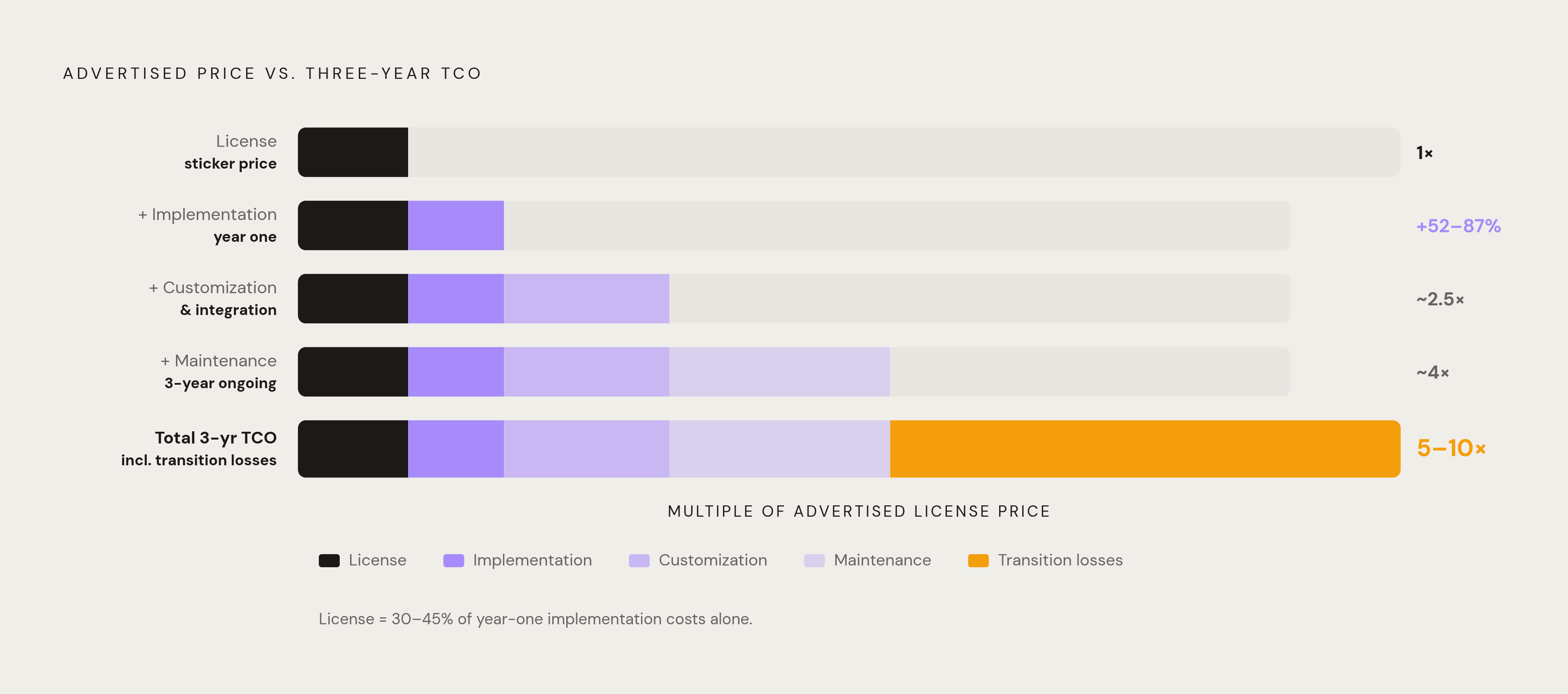
The sticker price is, genuinely, the smallest part of the number. Hidden fees and unexpected expenses inflate CRM pricing by 30–100% over the advertised cost, and that's before accounting for productivity losses during transition and ramp-up. Per research published in the World Journal of Advanced Engineering Technology and Sciences in 2025, implementation costs alone add 52–87% to the advertised subscription price in year one.
The license represents roughly 30–45% of first-year implementation costs. Over a three-year period, total cost of ownership runs 5–10x the sticker price when implementation, customization, maintenance, and transition losses are factored in. Small businesses pay $10–$50 per user per month; enterprises pay $150–$300 or more. Enterprise implementations with certified partners, which Salesforce recommends by default, run $10,000–$100,000 depending on complexity. The per-seat number in the demo slide is not your number.
Training is its own line item that buyers routinely overlook. Formal CRM training programs cost $100–$300 per user, and businesses with structured training see three times higher adoption rates. That math makes training one of the highest-ROI line items in the implementation budget, which makes it particularly strange that it's so often the first thing cut when the project goes over budget.
Ask every vendor, verbatim: "What is our total cost if we add ten users, double our contact count, and activate the email marketing module twelve months from now?" A vendor with transparent pricing gives you a number or a clear formula. A vendor who says "we'd need to put together a custom quote" is telling you the pricing is complex enough that they'd prefer you not calculate it yourself.
Contract terms deserve scrutiny before signing, not after the renewal notice arrives. Renewal price escalators, storage overages, API rate limits, exit clauses, and data export rights are where post-contract surprises live. Read them with the assumption that every ambiguity will be resolved in the vendor's favor.
How to evaluate integrations without a technical background
In Metrigy's 2024 survey, lack of sufficient integrations ranked as the second-highest reason firms considered replacing their CRM provider. Thirty-six percent of CRM buyers prioritize integration with other tools as a key selection criterion, per Capterra 2024. Together, those two data points suggest that integration evaluation is where buyers routinely underinvest during selection and pay for it at month seven.
The practical starting point requires no technical background at all: list every tool the team uses daily. Email, calendar, accounting, marketing automation, customer support, e-commerce platform. Before any demo, send that list to each vendor and ask which tools connect natively, which require a third-party connector like Zapier, and which require developer work. Native integrations carry lower ongoing maintenance risk than custom-built ones; third-party connectors introduce another pricing layer and another potential failure point.
There is one API question non-technical buyers still need to ask, even without a developer on staff: is the API publicly documented? Public API documentation signals that the vendor actively supports third-party developers and ecosystem integrations. You don't need to understand what an API does to interpret the answer; a public, well-maintained API means the platform is open to future flexibility, and a private or poorly documented one means it probably isn't.
The demo test that cuts through slide-deck claims is simple. Ask the vendor to demonstrate a live data sync between their CRM and your email platform. Not a screenshot, not a diagram, not a case study — a live sync, with real data, in the demo environment. The vendors who can do this without hesitation are the ones whose integrations actually work.
But what if the vendor says live demos of integrations aren't possible in a demo environment? That's worth treating as meaningful information. Forty-five percent of CRM buyers rank automation capabilities as their most important feature requirement, per Capterra 2024, and automation built on unreliable integrations is just a more elaborate version of the manual process it was supposed to replace.
Data quality and migration (the problems that surface six months after go-live)
Roughly 91% of CRM contact records are incomplete at the point of migration, and around 18% are duplicated. That's the baseline most organizations are starting from, and the migration process tends to surface every bad habit the organization has accumulated over years of inconsistent data entry.
Seventy-six percent of CRM users report that less than half of their organization's CRM data is accurate and complete, per Cyntexa. Thirty-seven percent of companies report losing revenue directly attributable to poor CRM data quality. And a substantial share of sales reps spend over an hour per day on manual data entry instead of selling, per CRM.org, which translates to more than 250 hours per rep annually redirected away from revenue activities.
Migration is where data problems compound into adoption problems. Rushing migration produces missing or inaccurate records that undermine trust in the system from day one; once reps discover they can't rely on the data, they stop updating it, which makes the data worse, which gives them more reason to stop. It is a spectacularly efficient failure loop.
The demo tests here are hands-on. Import a sample CSV with intentional duplicates and observe how the system detects and handles conflicts. Ask the vendor to demonstrate duplicate prevention, merge workflows, and validation rules on key fields like email addresses and company domains. Ask about governance features: standardized naming conventions, controlled picklists, and periodic data audit tools are the infrastructure that keeps data quality from degrading over time.
Data portability deserves a question in this conversation rather than waiting until the exit clause discussion. If the system makes it difficult to export clean data, a future migration becomes exponentially harder. The time to ask is before you're motivated by regret.
What vendor support actually looks like at each pricing tier
For teams without dedicated IT staff, the vendor's onboarding model is effectively a staffing decision. It determines how much internal capacity the CRM implementation will consume, and that's a business operations question with real headcount implications.
The tiered support trap works like this: on lower-tier plans, buyers are frequently limited to self-service documentation with no access to live support. The gap between plan tiers in responsiveness and dedicated attention is substantial, especially with enterprise-oriented vendors whose core business is large accounts and for whom smaller customers are, charitably speaking, less strategically urgent. CRMs built specifically for small businesses tend to offer more personalized support regardless of plan level, which is worth asking about directly before signing.
Organizations that spend three or more weeks on structured platform evaluation are substantially more likely to report successful implementation and positive ROI within 12 months, per Software Advice's 2024 CRM Implementation Success Factors research. This section connects to the final one: the evaluation process is itself an adoption intervention, not just a procurement step.
Genuine embedding in daily workflows takes 3–6 months after go-live. Support commitments need to span that full window, not just launch week, which is when most vendors are still paying close attention. Initial adoption occurring in the first 30–90 days is fine; it's the middle months that separate functional implementations from expensive shelfware.
Put these questions to every vendor directly: what does onboarding include at our plan level? Live sessions, documentation only, or a dedicated implementation contact? What happens when we hit a problem at month four? Is there a customer success function, or does support become reactive after go-live? A vendor who answers these questions with named resources and defined SLAs is operating differently from one who gestures at a knowledge base.
The internal factor that gets underweighted consistently: the most common root causes of failed adoption include lack of executive sponsorship and training treated as an afterthought. No vendor's onboarding model compensates for an organization that delegates the entire implementation to the software provider and checks back in at the quarterly review.
Security and compliance questions non-technical buyers can actually ask
Sixty percent of respondents in Capterra's July 2025 Sales and Marketing Software Trends survey (n=2,452) rate security as critical when evaluating new CRM software, ranking it higher than functionality or ease of use. Most non-technical buyers have no structured way to evaluate it, so security ends up as a checkbox rather than a substantive filter.
Security evaluation for a non-technical buyer is not about auditing architecture. It's about accountability and compliance posture, both of which you can assess through direct questions.
Ask every vendor whether they hold SOC 2 Type II certification. This is an independent audit of security controls conducted by a third party, not a vendor self-assessment. Ask to see the report summary. Ask where your data is stored and whether you can choose the region, which is relevant for GDPR, CCPA, and various industry-specific regulations. Ask what the vendor's breach notification policy is and what the response SLA looks like. Ask what happens to your data if you cancel and how quickly it gets deleted.
Compliance fit varies by industry in ways that eliminate some vendors before usability even enters the conversation. Healthcare buyers need HIPAA-compliant data handling; financial services buyers need audit trails and record-retention features; e-commerce buyers need GDPR and CCPA data subject request workflows built into the system, not bolted on through a third-party tool.
Access controls are worth a live demo specifically because they sit at the intersection of security and daily operations. Role-based permissions (meaning who can see what) are both a security feature and an organizational design decision. Ask to see how user roles are configured and, critically, whether a non-technical administrator can manage them without submitting a support ticket every time someone changes jobs.
The vendor's own transparency about security is itself a signal. Vendors who make compliance documentation difficult to locate, or who can't produce clear answers to the questions above, present a risk flag independent of their actual security posture. How a vendor handles the question tells you something about how they'll handle the incident.
How to structure the evaluation process itself so it produces a defensible decision
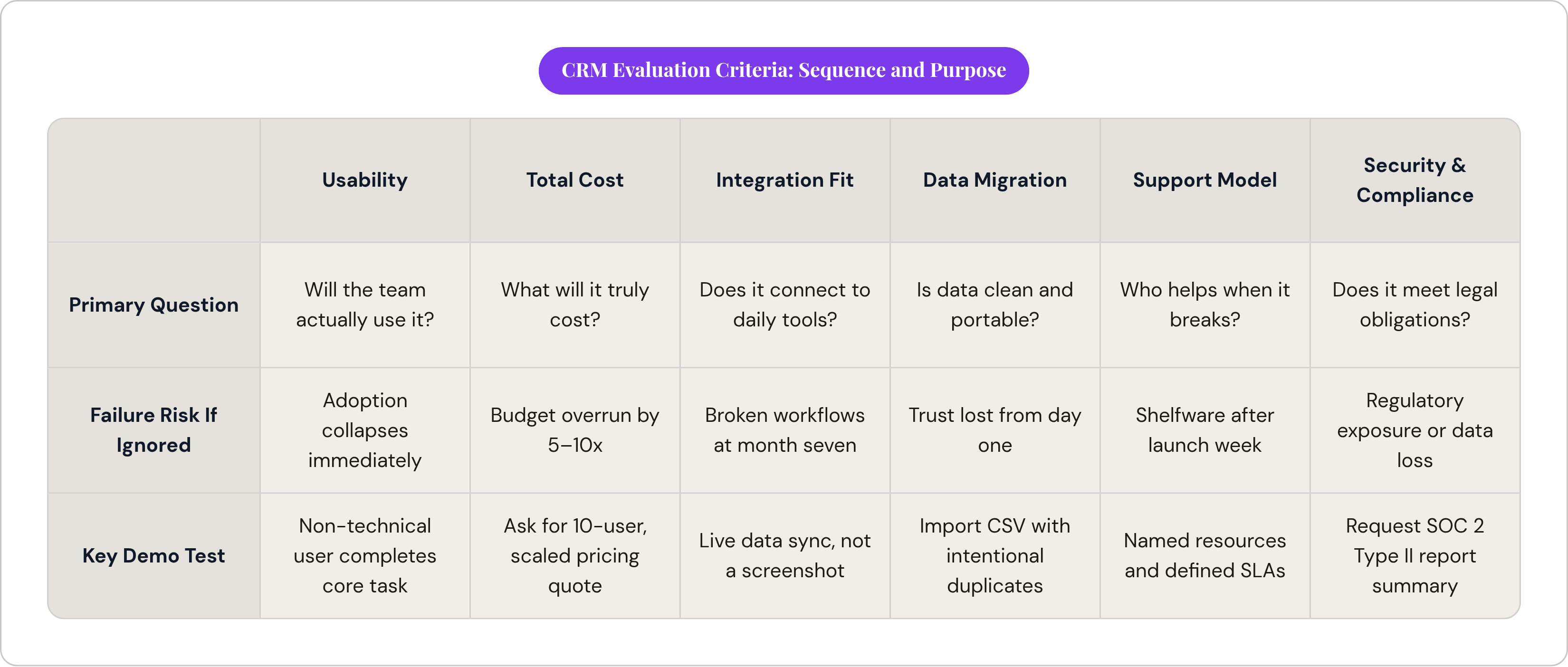
The evaluation process is a variable in the outcome, not just a prerequisite to it. Buyers who spend three or more weeks on structured evaluation are substantially more likely to report successful implementation, per Software Advice 2024. Compressing the decision timeline compounds every downstream risk this article has covered.
Sequence the criteria in order of elimination risk, moving from the factors most likely to produce a hard no toward the ones that refine among acceptable options. Usability comes first; a system the team won't use eliminates itself regardless of other strengths. Total cost of ownership is second, using the vendor's number as a starting point and recalculating with the questions from the pricing section before proceeding. Integration fit is third, mapped against the team's actual tool stack. Data migration and quality are fourth, tested in the demo with a real CSV. Support model is fifth, matched against the team's internal capacity. Security and compliance confirms minimum requirements before finalizing the shortlist.
Build the demo script around your workflow, not the vendor's preferred narrative. Give each vendor the same scenario drawn from a real sales process your team actually runs. Have a non-technical team member perform a core task during the demo. Score against the criteria in this article, not against the vendor's feature matrix, because the feature matrix was designed to make the vendor look good, not to help you make a defensible decision six months later when someone asks why you chose what you chose.
Involve end users in shortlisting. Adoption data consistently shows that teams who had input into the selection are more likely to use the system. The evaluation process is the first adoption intervention, and running it without the people who will live in the system daily is a predictable way to lose them before go-live.
For the internal alignment work that often gets skipped during CRM evaluations (scoring frameworks, decision templates, the stakeholder communication that gets everyone reading from the same document) content operations platforms can accelerate that coordination meaningfully. The buying decision has a documentation layer that most teams underinvest in, and that documentation is what makes the decision defensible when the second-guessing starts.
Read the exit clause before signing. Knowing how to leave a vendor before you commit to them is not pessimism — given the failure rates this article opened with, it's just arithmetic.