CRM Pricing Models Compared
Most CRM pricing pages hide the true cost—licensing is only 30-40% of what you'll actually spend.
CRM pricing looks simple until you actually try to buy one. This piece walks through the six pricing models running the CRM market today: per-seat, tiered feature gating, freemium, contact-based/flat-fee, usage-based, and enterprise custom. My thesis, after sitting through more vendor calls than I care to admit: the per-seat number on the pricing page is the least useful number for figuring out what you'll actually pay, and total cost of ownership is the only honest way to compare two systems.
Licensing fees, by most industry estimates, account for something like 30 to 40% of what companies actually spend on their CRM in a given year. The rest lives in implementation, admin overhead, integrations, and the add-ons nobody reads about until they're three months into a rollout and someone in finance asks why the invoice doesn't match the quote. So when someone asks "what does Salesforce cost" or "is HubSpot cheaper than Zoho," the honest answer is: compared to what, at what scale, with which features turned on?
How per-user pricing scales — and where it turns against you
Per-user pricing is the default because it's the easiest thing to explain on a sales call. You pay for each person who logs in, the bill grows with headcount, everyone nods, deal closes. It's also the model most likely to bite you eighteen months later, and the mechanism isn't complicated at all. It's just multiplication, and multiplication doesn't care about your budget forecast.
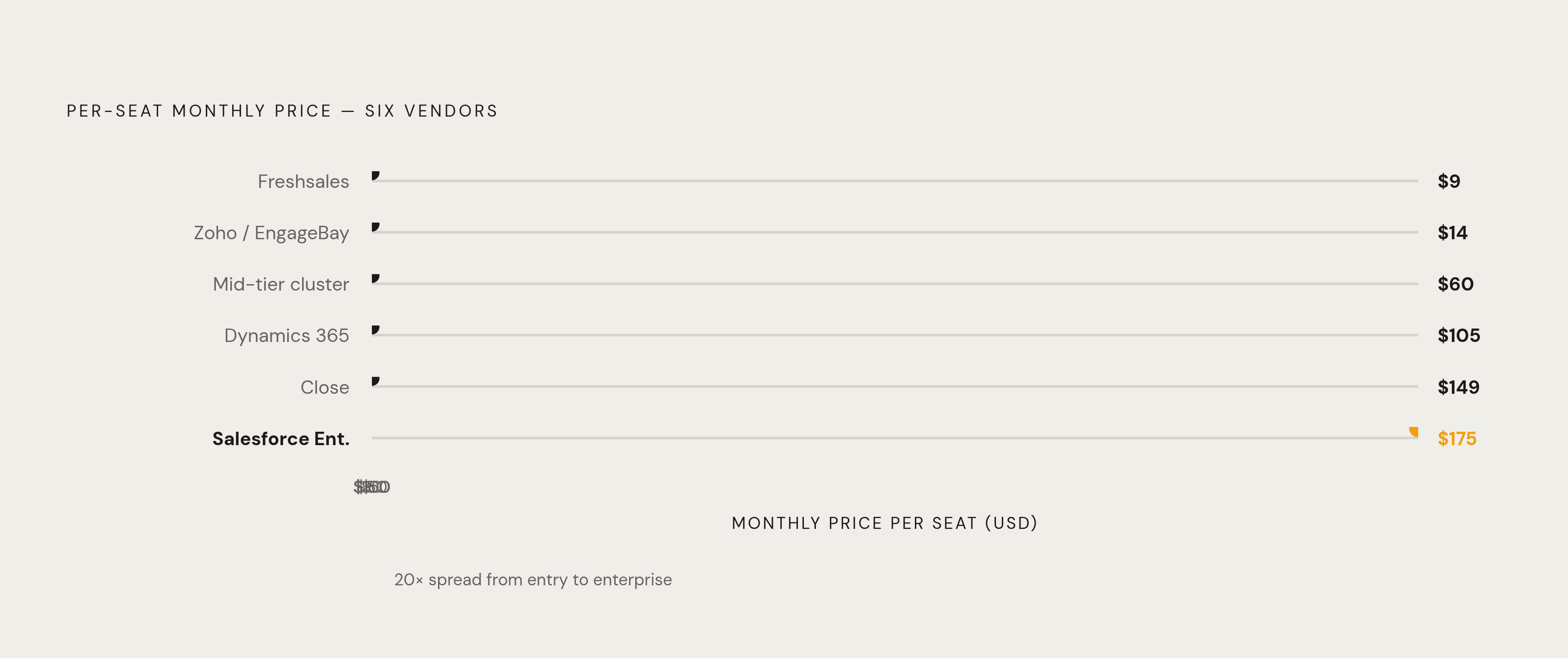
The spread across vendors is wide. Freshsales starts around $9 a seat monthly. Zoho CRM and EngageBay sit near $14 to $15. Mid-tier plans across the market cluster around $60, and once you're in enterprise territory you're looking at $105 for Microsoft Dynamics 365 Sales Enterprise, $149 for Close, $175 for Salesforce Enterprise. Add a zero to some vendors' top tiers and you're still in the right neighborhood.
At 8 or 12 users, per-seat pricing feels like pocket change. Nobody blinks. At 75 or 150 users, the same linear math that made it cheap now makes it brutal, because nothing about the model changes as you scale; it just keeps multiplying, quietly, in the background, while you're focused on hiring. A company that doubles its sales team has, without negotiating anything or upgrading a single feature, doubled its CRM bill. Compare that to a flat-fee model where the price stays fixed no matter who logs in, and the crossover point, where per-seat stops being the bargain, arrives faster than most finance teams expect.
There's a second wrinkle that catches people off guard: not every vendor defines "user" the same way. Some count a read-only person, someone who glances at a dashboard once a week, as a full seat. If your org has managers, execs, or support staff who need occasional visibility but not full access, ask about this before signing anything. And if you're growing fast, run the math at 2x and 3x your current headcount first. It's a five-minute spreadsheet exercise that saves a genuinely uncomfortable budget conversation down the road.
What tiered feature gating actually means for what you pay
Tiered gating sits on top of per-seat pricing as a second, quieter cost layer. The seat price climbs at each tier, sure, but the real cost driver is what functionality gets locked behind the wall, and vendors are not shy about using that lock strategically.
HubSpot shows this pattern clearly. Starter runs a flat $50 a month with no workflows, no automation. Professional, where sequences and automation actually live, jumps to $800 a month. That's roughly a 16x jump for capability most sales teams would call table stakes, not a luxury upgrade.
What trips buyers up isn't the price of the tier they need today. It's that they budget for today's needs and get surprised twelve months later when automation, which felt optional at signup, becomes the thing the whole sales process runs on. The tier jump rarely tracks the actual cost or value of the feature; it tracks what the vendor decided would move you up the ladder. So map every feature you'll need over the next year, not just this quarter, to the exact tier that unlocks it, before you compare any vendor's advertised entry price. The entry number almost always understates what you end up paying.
Onboarding fees make this worse in ways that never show up in the per-seat rate. HubSpot's Sales Hub Professional carries a one-time onboarding charge, and Enterprise carries a bigger one. Neither appears anywhere near the monthly price you see on the comparison page, which feels like a small thing until you're the one explaining the gap to your CFO.
The freemium entry point and the upgrade economics behind it
Free CRM tiers are genuinely useful, and I mean that without the usual asterisk. The business logic behind freemium isn't charity, though. It's built around the exact moment the free tier stops being enough, and that moment tends to arrive right when you're too dependent on the tool to walk away easily.
Not all free tiers are equal, and the gap is bigger than most people assume walking in. HubSpot's free plan allows unlimited users and unlimited contacts with a decent set of core tools. Zoho CRM's free version caps out at three users, which for a team of five isn't really a free tier so much as a temporary allowance with a countdown clock.
The common limits across free plans are predictable once you've seen a few: contact caps, outbound emails carrying the vendor's branding whether you like it or not, no automation, no custom reporting, integrations locked down. None of that's a scandal; it's how freemium works across software generally, not just CRM. What's worth watching is the jump itself, which is often steeper than expected, especially after a year of building workflows around what the free tier allows, only to relearn those same workflows around what the paid tier demands.
Data migration is the quiet cost here. The longer you stay on a free plan, the more contacts, notes, deal history, and integrations get baked into that specific tool, and the harder it gets to leave, whether you're moving to the paid version of the same product or jumping to a competitor. Freemium is a fine front door for an early-stage team. Treat it as a temporary arrangement rather than a permanent home, and price out the upgrade before your data gets too comfortable where it is.
Contact-based and flat-fee pricing — better for large teams, expensive relative to database size
Contact-based pricing flips the whole scaling logic on its head. Instead of charging by how many people use the tool, it charges by how many contacts live in the database, which means your bill can climb even if your headcount never moves.
HubSpot's Marketing Hub is the reference case. Professional starts at $800 a month, Enterprise starts at $3,600, and those numbers are per account, not per seat. For a large team sharing one CRM across dozens or hundreds of users, that structure can end up dramatically cheaper than per-seat pricing, since you're not multiplying by headcount at all. For a small team sitting on a large contact list, built up over years of trade shows, list imports, and content downloads, it can turn into the single most expensive option on the table.
The scaling trap runs in the opposite direction from per-seat pricing. Per-seat punishes you for hiring. Contact-based punishes you for marketing, for running a campaign that pulls in five thousand new leads, for buying a list, for enriching your database through a third-party data provider. None of that has anything to do with team size, and yet it shows up on the invoice all the same.
Here's where you actually get some leverage: contact hygiene becomes a real, dollar-denominated lever once you're on this model. Duplicate records, unsubscribed contacts sitting dead in the system, stale leads from a campaign that ran two years ago; every one of those is inflating your bill for zero operational benefit. A quarterly database audit isn't just good hygiene, it has a calculable dollar value attached to it.
Watch for hybrid billing too. Some vendors charge a flat platform fee and then layer a per-seat rate on top for specific modules, so you're not comparing one axis of cost, you're comparing two or three at once. Find every billing axis before you do the math, or the math will just be wrong.
Usage-based and AI-credit pricing — the emerging model that legacy budgeting processes aren't built for
Usage-based pricing charges for what happens, not for who's watching it happen: API calls, AI agent conversations, emails sent, support tickets resolved. It's the newest major model in the CRM space, and it's growing fast; Salesforce's own 2026 State of Sales report found 76% of sales leaders say usage-based pricing matters more to their customers now than it did just a year earlier, in 2025.
Zendesk is worth knowing here. In 2024, the company introduced outcome-based pricing for its AI agents, where you get charged when the AI actually resolves a customer issue, not simply for having the seat that gives you access to the AI. Salesforce runs similar logic with its Agentforce add-ons: the base license gets you into the platform, and AI agent activity generates its own consumption charges stacked on top of that.
This breaks a lot of budgeting processes, and here's why. Per-seat costs are predictable, easy to forecast a year out. Usage costs are the opposite; they spike when a marketing campaign goes big, when support ticket volume jumps during a launch, when your team suddenly leans hard on an AI feature and starts running it on everything because it's there. Finance teams built their forecasting models around the predictable version. The usage version doesn't sit still long enough to forecast the same way, and it can wreck a quarterly budget without anyone doing anything wrong.
Before adopting anything billed on consumption, ask the vendor for a cost estimate built on your actual usage projections, not their example numbers, and ask specifically whether cap or ceiling options exist. Teams that skip this step, and adopt AI features heavily without modeling what the consumption actually costs, can watch their effective per-user price climb well past the number on the pricing page.
Per-user pricing is the default because it's the easiest thing to explain on a sales call.
Enterprise custom pricing and the negotiation dynamics buyers rarely use to their advantage
Custom enterprise pricing generally runs somewhere between $50,000 and $250,000 a year, and it comes with a fundamentally different buying process: direct negotiation, not clicking through self-serve tiers on a website.
The number one thing buyers get wrong here is treating the list price as fixed. It isn't, not even close. Enterprise discounts of 30 to 60% off list are standard practice for Salesforce and comparable large platforms; the list price is a negotiating anchor, not a bill. What actually moves the number are multi-year commitments, bundling additional modules into the same contract, and timing the deployment against the vendor's own fiscal quarter. Vendors close deals to hit their own numbers too, and that timing pressure cuts both ways.
Microsoft has built in a structural advantage that doesn't require any negotiating skill at all, just the awareness that it exists: organizations already running Microsoft 365 Enterprise, the E3 or E5 tiers, can bundle in Dynamics 365 and land a meaningfully lower effective cost than a standalone Dynamics purchase would run. That's not a discount you negotiate for; it's a discount you qualify for by already being a Microsoft shop.
There's a floor to watch for too. Dynamics 365 Sales Premium carries a minimum user requirement, so smaller teams trying to access the premium feature set may find themselves paying for seats they don't have people to fill.
Then there's the part that rarely comes up at the negotiating table but absolutely should: escalator clauses buried in multi-year contracts. Salesforce applied a 6% price increase to its Enterprise and Unlimited editions in 2025, with further increases in the 5 to 7% range expected going forward. Salesforce's Enterprise list price rose roughly 40% between 2014 and 2025. That trajectory is legitimate ammunition to bring into a negotiation; if a vendor's pricing history shows a steady climb, that's your case for locking in longer-term rate protection now instead of absorbing the increases later.
How implementation, integrations, and administration inflate the bill beyond the license
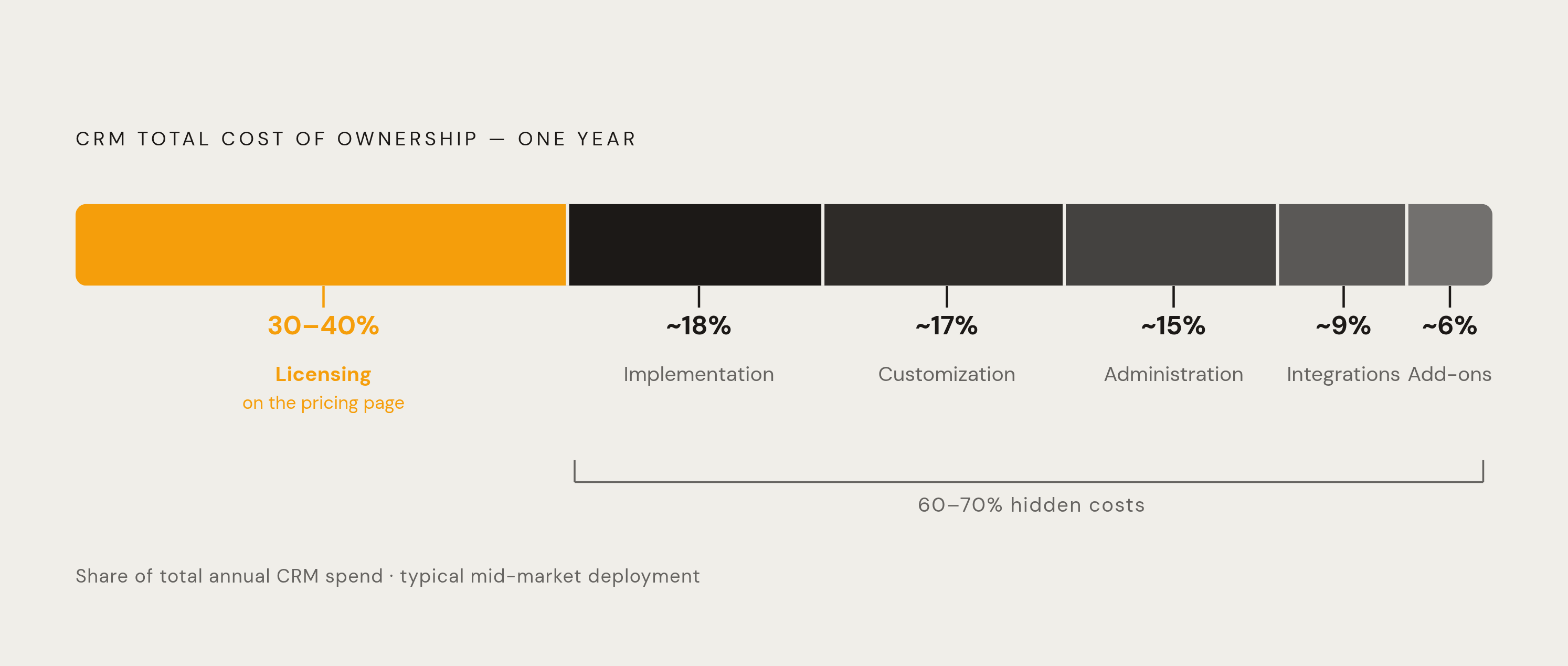
Here's the number worth sitting with: licensing is only 30 to 40% of what you actually spend. The rest is implementation, customization, ongoing administration, and the add-ons that never quite make it onto the pricing page.
First-year CRM spend routinely runs well above the annual license cost alone, once you fold in professional services, data migration from whatever system you're replacing, and training for the people who now have to use the thing instead of the spreadsheet they've been hoarding for years. Salesforce deployments typically take 3 to 6 months to go live, and every one of those months is a month you're paying licensing fees for a tool that isn't yet doing anything for you. Nobody puts that on a slide, but it belongs in the math.
Pipedrive is a good, concrete example of how add-ons quietly reshape the real price. The Lite plan starts at $14 a user monthly, which looks lean and, on paper, is lean. But LeadBooster and Smart Docs, the add-ons a lot of sales teams end up wanting within a year, carry their own per-company monthly fees on top, and those fees can push total spend well past what the headline seat price implied.
Salesforce's marketplace, with thousands of apps available, cuts both ways. It's a genuine strength in terms of what you can build, and it's a cost exposure most buyers underestimate, since plenty of those "free" integrations carry their own per-seat or usage charges once you actually install them. Then there's the admin question. Complex platforms need dedicated administrators, people whose full-time job is keeping the CRM configured, clean, and functional, and that fully-loaded salary belongs in your TCO math even though no vendor pricing page will ever mention it.
The upside case is real, to be fair, and I don't want to talk you out of buying a CRM entirely. DemandSage data puts average CRM ROI at $8.71 returned per dollar spent. That number assumes a deployment that actually works, though, adopted by a team that actually uses it. Stall the rollout, or let adoption die on the vine, and that ratio doesn't just shrink. It can flip.
A side-by-side read of the major vendors through the TCO lens
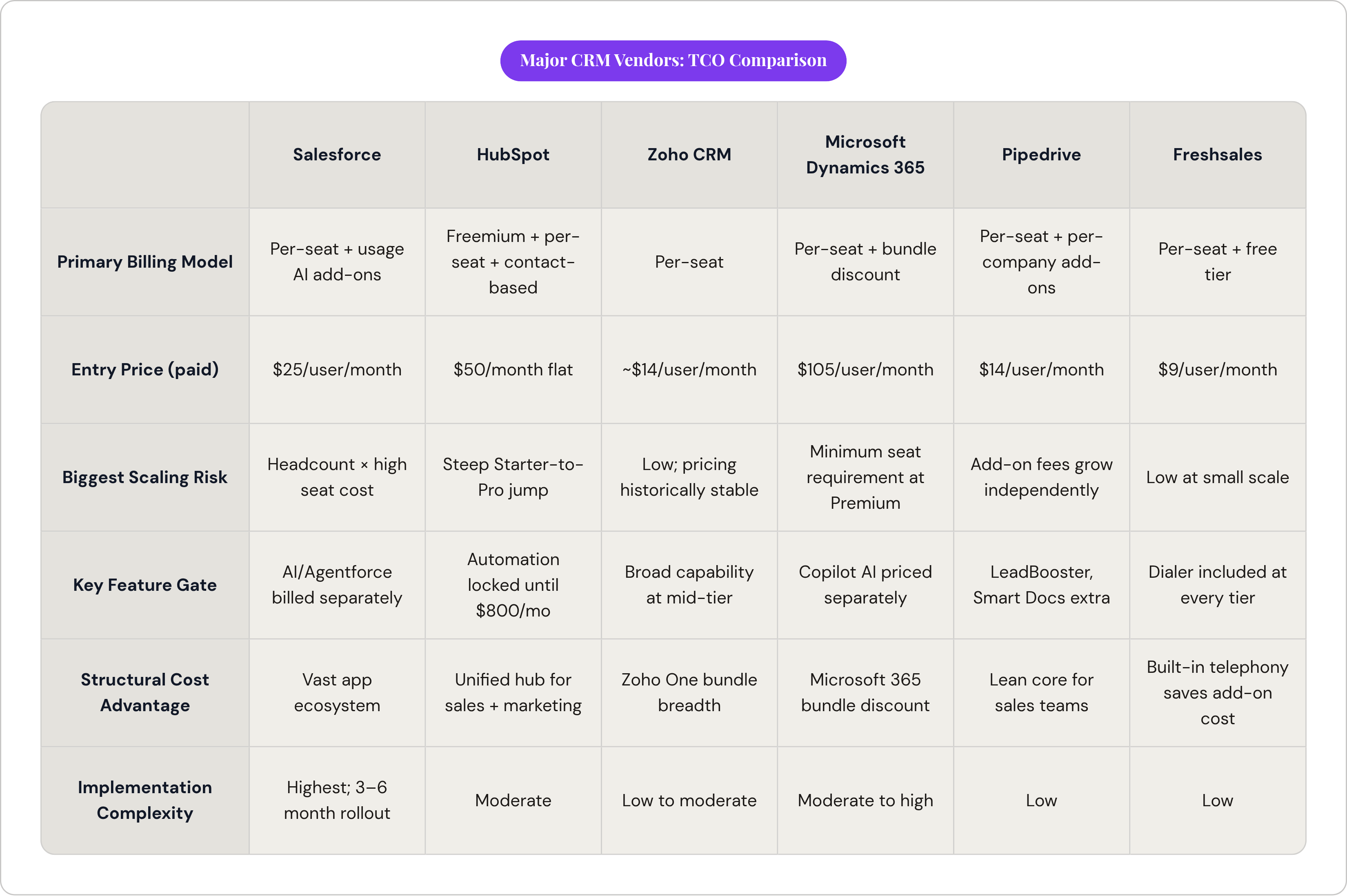
The right way to compare vendors isn't the headline rate. It's billing model, scaling trigger, feature-gate risk, add-on exposure, and price trajectory, looked at side by side, ideally before you're already three meetings deep with a sales rep.
Salesforce runs per-seat, tiered, with usage-based AI add-ons stacked on top. Entry point is the Starter Suite at $25 a user monthly, climbing to $175 for Enterprise and $350 for Unlimited. It carries the highest implementation complexity and longest deployment timeline of anything covered here, and its vast app marketplace means licensing is a smaller slice of total spend than it looks like on the surface. The documented 40% list price rise from 2014 to 2025 deserves a spot in any multi-year decision.
HubSpot leads with a genuinely useful freemium tier, then layers per-seat pricing and contact-based marketing pricing in parallel, which is its own kind of complexity. The Starter-to-Professional jump, from $50 to $800 a month for automation, is the steepest feature-gate cliff of any vendor discussed here. It fits best for teams that can live inside a single hub; costs compound quickly once you're bundling multiple hubs together.
Zoho CRM runs per-seat with a track record of pricing stability that's genuinely rare in this market. Its Professional tier gets you capability comparable to Salesforce's equivalent tier at a fraction of the price, and the Zoho One bundle adds more than 45 apps at a per-user rate that competes with standalone CRM pricing elsewhere. Strong fit for cost-sensitive teams that want breadth without enterprise-level complexity strapped onto it.
Microsoft Dynamics 365 runs per-seat, with the Microsoft 365 bundle discount as its structural advantage, and Copilot AI features priced and sold separately. Organizations already on Microsoft 365 Enterprise (E3 or E5) get a real, calculable cost reduction just by bundling Dynamics in, no negotiation required. Watch the minimum seat requirement at the Premium tier if your team is small.
Pipedrive is per-seat with no free tier, and its add-on fees (LeadBooster, Smart Docs) scale independently of headcount, charged per company rather than per user. Fits sales-focused teams that want something lean at the core; just price out the add-ons before assuming the base rate tells the whole story.
Freshsales offers the lowest paid entry point covered here, at $9 a user monthly, and includes a built-in phone dialer at every tier, including the free one, which is a real, quantifiable value-add most competitors charge extra for. Strong fit for smaller teams running high call volume, where the included telephony alone can offset what you'd otherwise pay in add-on fees elsewhere.
The questions to answer before committing to any CRM pricing model
The first question is the billing trigger itself: is your cost tied to seats, contacts, usage, or some blend of the three, and which of those is growing fastest inside your actual business right now? A sales-led org growing headcount fast should be nervous about per-seat. A marketing-heavy org growing its contact database fast should be nervous about contact-based pricing. Know which risk applies to you before you know anything else.
Run the numbers at your current size, then at double, then at triple, for both team and contact list. Which pricing model stays predictable as those numbers grow, and which one starts to misbehave? That answer tells you more than any demo call will, since demo calls are, by design, built to avoid telling you that.
Map every feature you actually need, this year and realistically next year, to the exact tier that unlocks it, before a headline price anchors your thinking. Price out every add-on your workflow depends on: telephony, document tools, lead generation, AI features, advanced reporting. These sit outside the base license far more often than vendors' pricing pages let on.
Separate implementation and admin cost from the license entirely, and give it its own line item, because for platforms with long deployment timelines or real configuration complexity, that number routinely outweighs first-year licensing. Check the contract's escalator language too: what's the vendor's documented history of price increases, and what ceiling, if any, does the contract put on rate hikes at renewal?
If you're negotiating an enterprise deal, walk in treating multi-year commitment, module bundling, and deployment timing as levers you control, not favors you're asking for. List price is a floor, never a ceiling. The vendors that seem most rigid on price are often the ones with the most room to move, once you know which questions to ask and, more importantly, which ones to ask twice.
Sources
- https://www.thriwin.io/blogs/crm-pricing-models-in-2024
Covers the main CRM pricing models discussed in the article, including per-seat, tiered, freemium, and usage-based structures.
- https://www.alphabold.com/crm-pricing-models-complete-guide-for-decision-makers/
Provides decision-maker guidance on CRM pricing structures and total cost of ownership considerations covered in the article.
- https://solutions.trustradius.com/buyer-blog/crm-pricing/
Covers CRM pricing comparisons including per-seat models and how licensing fees relate to total spend.
- https://www.sparrowcrm.com/blogs/crm-pricing-models-explained
Explains the six CRM pricing models the article surveys, including contact-based and enterprise custom pricing.
- https://capsulecrm.com/blog/CRM-pricing/
Discusses how CRM pricing models work in practice and where hidden costs arise beyond the listed per-seat price.
- https://www.creatio.com/glossary/crm-pricing
Provides definitions and context for CRM pricing terminology used throughout the article.
- https://vantagepoint.io/blog/sf/crm-total-cost-of-ownership-tco-analysis-guide
Supplied the total cost of ownership framework the article presents as the honest way to compare CRM systems.
- https://www.lowcode.agency/blog/crm-hidden-pricing-total-cost-of-ownership
Provided detail on hidden CRM costs such as implementation, admin overhead, integrations, and add-ons that inflate spending beyond licensing fees.