Agentic CRM Workflows and Autonomous Deal Progression
Agentic CRM systems execute sales tasks autonomously rather than just recommending them.

Agentic CRM is the term vendors use for a system that acts on your pipeline instead of just showing it to you. The distinction sounds small until you sit with it: a traditional CRM is a system of record, meaning it stores and organizes data while a human decides what to do with it, and an agentic one is a system of action, meaning it decides and does something with that data before a rep even opens the tab.
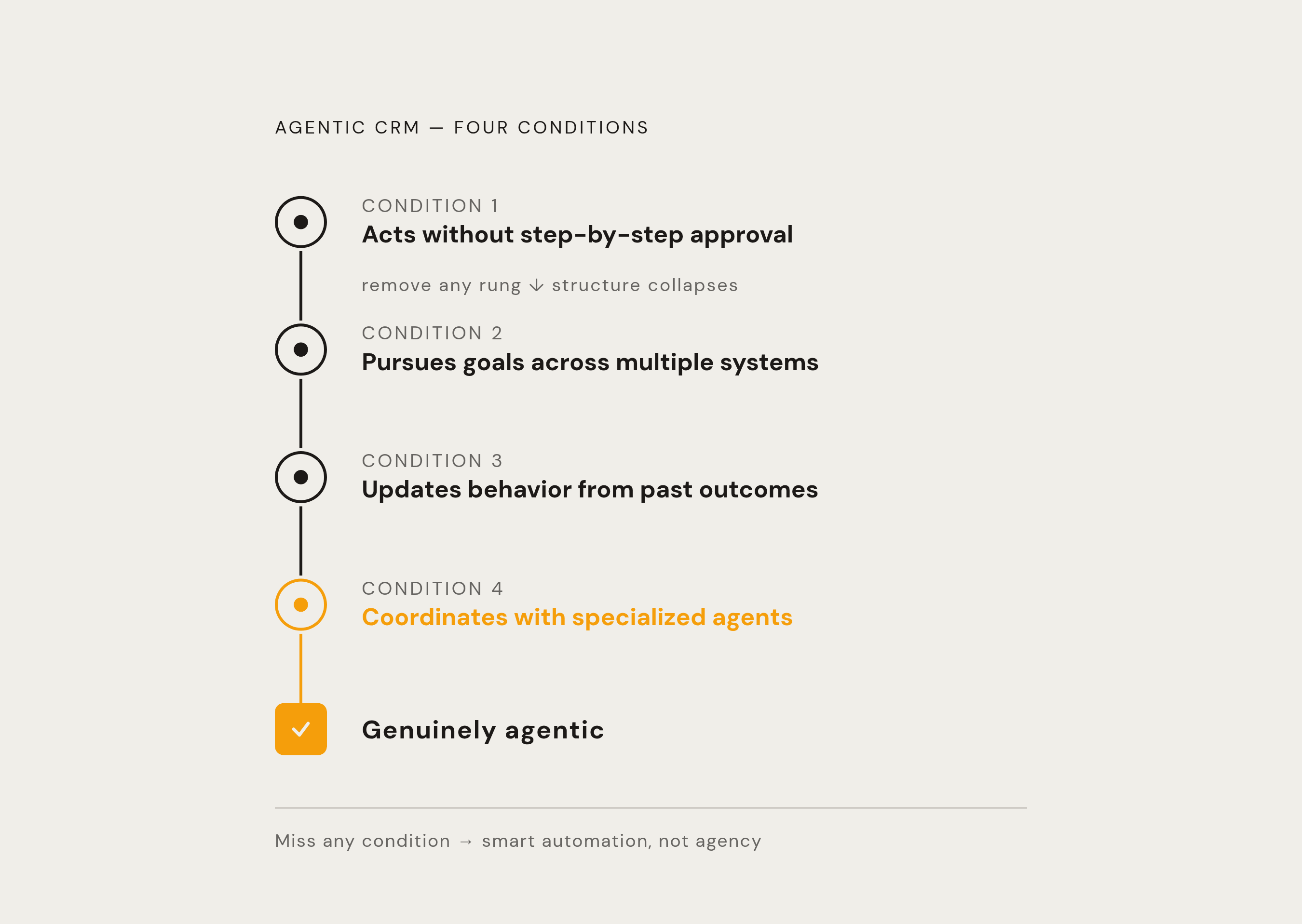
That's the whole shift in one sentence, but the details are where it gets interesting, and also where the marketing gets slippery. AIMultiple lays out four properties that separate a genuinely agentic system from a fancy automation script: it makes decisions without asking for approval on every step, it pursues a goal across multiple systems rather than firing off one action and stopping, it updates its own behavior based on what worked before, and it coordinates with other specialized agents instead of running as one big monolithic brain. Miss any of those four and you've got a smart automation rather than an agent. Worth remembering that, because plenty of products wearing the "agentic" badge are really just very polished suggestion engines. HubSpot's Smart Deal Progression tool, which we'll get to later, is a good example of that gap; it reads meeting transcripts and recommends CRM updates, but a rep still has to click approve. If a human has to bless every recommendation, the admin burden hasn't shrunk so much as changed shirts.
Why does any of this matter operationally? The bottlenecks that eat a sales rep's week (CRM updates, account research, chasing down approvals, quote-to-close paperwork) all share one structural feature: they cross multiple systems and multiple people, according to Moveworks, and that's exactly where human handoffs cause delay. An agentic architecture targets that seam directly, which is what makes it worth the operational overhaul.
How agentic systems sense context and decide what to do next
Here's the loop, stripped down: the agent perceives something (a stalled email thread, a missed call, a spike in product usage), reasons about what that signal means for the health of the deal, then acts, without waiting for a rep to notice the same pattern three days later during a pipeline review.
What does "perceive" actually mean here? It means ingesting (i) engagement patterns like stakeholder open rates and meeting attendance, (ii) behavioral signals like website visits or a hiring announcement at the target company, (iii) conversation data pulled from call transcripts, and (iv) historical CRM data on how long deals like this one generally sit in a given stage. Stack those four together and you get something closer to a weather forecast for a deal than a status update.
Aviso's approach illustrates how this perception layer gets sliced up by role, and it's a useful example because it shows agentic design isn't one-size-fits-all. A Forecast Avatar reads pipeline data for sales ops. A Pipeline Health Avatar flags risk for the VP of Sales. An Engagement Avatar tells SDRs when to reach out. A Coaching Avatar surfaces rep-specific patterns for managers, and a Renewal Avatar watches health signals for customer success. Same underlying data, five different lenses, because a VP and an SDR are not, in fact, looking for the same thing at 9am on a Tuesday.
Research consistently shows that accounts prioritized by intent signals convert at higher rates and close faster than accounts worked without that prioritization. The real argument for signal-sensing has less to do with speed and more to do with detection: agents catch the signal in the first place, before a human would have noticed it. Here's the catch that gets glossed over in most vendor decks: the system is only as good as what it's fed. Feed it sloppy, half-updated CRM fields and you get sloppy, half-informed decisions, delivered with more confidence and less friction. Agentic architecture doesn't fix bad data hygiene; it amplifies whatever discipline, or lack of it, already exists.
Where autonomous action actually changes deal progression (the core use cases)
Lead qualification and routing is the most obvious entry point. Agents can qualify a lead in real time, enrich the contact profile with outside data, and route it to whichever rep has historically converted similar accounts best, all within minutes of the lead coming in. Aviso reports time-to-first-touch dropping from two days to under four hours. That gap matters more than it sounds like it should, because inbound intent decays fast; a lead that runs hot on Monday morning is lukewarm by Wednesday.
Deal monitoring is the second big one, and arguably the sneakier of the two. A Deal Progression Manager agent tracks stakeholder engagement continuously and flags a stalled deal without anyone having to schedule a meeting to check on account status. Aviso reports at-risk accounts getting flagged six to eight weeks earlier than a traditional customer success review cycle would catch them. Six to eight weeks is not a rounding error; that's the difference between renegotiating a contract and writing it off.
Post-call automation is where the compounding effect kicks in, and it's worth sitting with for a second. Agents transcribe the call, pull out the deal signals, and generate a recap with action items in minutes, no manual note-taking required. Aviso reports a 15 to 20% improvement in deal progression from this alone. The more interesting mechanism is a behavior change rather than a time savings: when reps don't have to write call notes by hand, they stop skipping them. CRM data quality goes up, and since every other agent in the system is reading that same CRM data, better notes today mean better decisions tomorrow, across the board.
Executive prep tells a similar story from a different angle. Auto-generating a QBR deck from live usage and ROI data drops CSM prep time from roughly eight hours to half an hour, per Aviso's figures. The value there goes beyond speed: a deck built from live data captures nuance a human working from memory and a spreadsheet would probably flatten or just leave out.
Then there's compliance logging, the least glamorous use case on this list and maybe the most quietly important one. Automating it cuts daily logging time from 45 to 60 minutes down to 5 to 10, a 90% reduction according to Coffee.ai's 2026 data security analysis. Nobody brags about compliance logs at a sales kickoff, yet inconsistent documentation is a legal and audit exposure, and an agent applying the same template every time reduces the variance that turns into a problem eighteen months later during an audit nobody wanted to think about.
How multi-agent orchestration coordinates a pipeline without a human conductor
One agent doing one task well is automation, and a useful kind at that, but the more interesting layer sits above it: a central orchestration system coordinating several specialist agents across an entire pipeline, handing work from one to the next without a human standing in the middle directing traffic.
Picture the sequence: one agent spots a new lead, hands it to a second agent that qualifies and enriches it, which hands it to a third that schedules the follow-up or drafts the outreach email. No rep bridges those steps. The agents share a common knowledge base, so the qualification agent and the follow-up agent are working from the same deal history rather than two different half-pictures of the same account.
Salesforce's 2026 Connectivity Report, surveying 1,050 enterprise IT leaders, found organizations running an average of 12 AI agents apiece, but roughly half of those agents operate in isolated silos rather than as part of a coordinated system. That's the whole architecture problem in one statistic: twelve agents that don't talk to each other are twelve automations wearing the same badge, not a coordinated pipeline. The same report projects agent count will climb 67% within two years, which means the governance question gets more urgent, not less; more agents without coordination is just more noise, faster.
Salesforce's response has been to introduce a metric called Agentic Work Units, or AWUs, which count discrete completed tasks rather than just how many agents a company has deployed. That's a meaningful shift in how the industry measures success, tying credit to whether something actually finished rather than to how many agents got switched on. Other major platform vendors have signaled parallel moves toward centralized control planes where IT can govern and secure agents across the org, treating them as an extension of the workforce that needs managing. Both moves point at the same underlying anxiety: agents are multiplying faster than anyone's built the plumbing to supervise them.
An agentic architecture targets that seam directly, which is what makes it worth the operational overhaul.
What the major platforms have actually shipped versus what they've announced
Salesforce's Agentforce launched in late 2024 and scaled hard through 2025. By Q4 of fiscal year 2026, Futurum Group reported more than 29,000 cumulative deals closed, with deal count rising 50% quarter over quarter, and annual recurring revenue at $800 million, up 169% year over year. Inside Salesforce's own operations, agents reportedly handled more than 2.8 million interactions and saved employees over 500,000 hours through Agentforce in Slack alone. Customers, per the same reporting, attributed over $100 million in annualized cost savings and a 34% productivity increase to agentic and generative AI tools. Salesforce has also moved to make agent creation more accessible beyond developer audiences, which tends to be the unglamorous unlock that actually drives adoption numbers. The AWU metric also signals something about pricing strategy: Salesforce is angling toward outcome-based pricing rather than the old per-seat model, a genuinely different way to budget for this stuff.
HubSpot's approach, under the Breeze umbrella, splits into three layers with three different levels of autonomy: Breeze Assistant handles conversational, in-platform help, Breeze Agents run autonomous workflows, and Breeze Intelligence does enrichment and intent scoring. Smart Deal Progression, shipped in 2026, reads meeting transcripts and suggests CRM updates, stage changes, and follow-up emails, but it operates on a suggestion model, meaning a rep approves every action before it happens. Calling this "agentic" without qualification oversells it; a more accurate description is AI-assisted work, with a human still making every final call. Agent Hub, as of July 2026, brings together pre-built agents, custom agents, and workflows under one roof, with a current lineup including a Prospecting Agent, Customer Agent, Data Agent, the Deal Progression tool, and an Agentic Engagement Object still in beta, worth watching once it graduates.
Other platforms also matured through 2025 and 2026, making agent creation more accessible for smaller teams that don't have a dedicated ops function to configure things. Most of the rest of the field, though, still sits in copilot or workflow-bot territory rather than running fully autonomous, multi-step agents. The gap between announcing an agent and shipping something that acts independently across a pipeline is still wide, and it's worth checking which side of that line a given feature actually sits on before believing the press release.
Where human judgment still governs (the write-permission boundary)
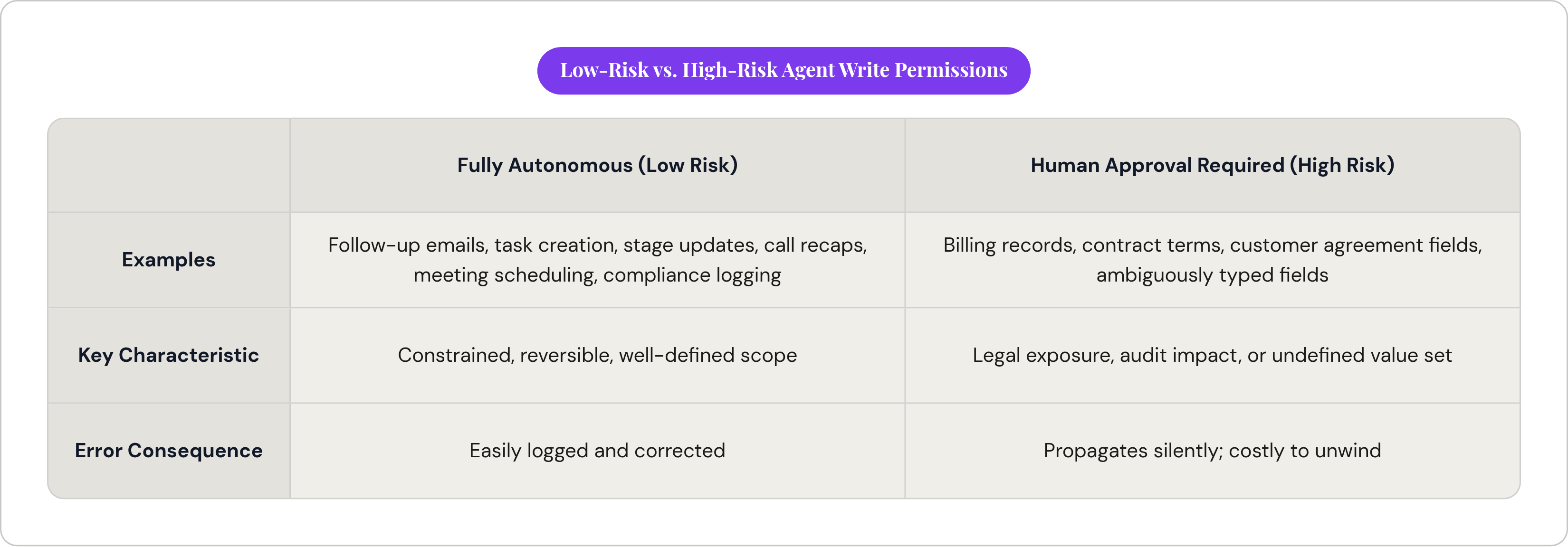
Autonomy and human oversight operate at different risk tiers, and the smart systems know which tier they're in.
Low-risk, fully-autonomous-appropriate territory looks like this: (i) sending a follow-up email within an approved template, (ii) flagging a stalled deal, (iii) updating a contact field or an opportunity stage, (iv) creating a task, (v) logging a compliance entry, (vi) scheduling a meeting, (vii) drafting a call recap. None of that needs you standing over the agent's shoulder.
High-risk territory is a different animal. Per agxntsix.ai's analysis of CRM write operations, agents generally shouldn't have write access to (i) billing records, (ii) contract terms, (iii) existing customer agreement fields, or, as a general rule, any field that lacks a clearly defined data type, a constrained set of acceptable values, and an explicit permission scope. That last part is the real test. An agent that can write to anything is an audit nightmare waiting to happen; one with tightly scoped permissions is a system you can actually reason about and defend later if someone asks why a field changed.
Across the organizations that have put agents into production, sales leaders broadly describe them as critical to meeting business demands. That "critical" label rests on prior groundwork, though: the leaders in that 94% tend to be the ones who built out permission scopes and governance before they let agents anywhere near production data, not after something went wrong. That sequencing matters. The finding from Gartner/SisGain that sales teams spend up to 60% of their time on administrative work is the backdrop that makes governance an existential question rather than a nice-to-have: the whole point of reclaiming that time evaporates if agents create new errors that you then have to spend your reclaimed hours cleaning up.
What measured outcomes look like (and what the numbers don't tell you)
Start with the productivity numbers, because they're genuinely striking. Research from ZoomInfo/Market.us found sales teams using AI save up to two hours a day on administrative work, alongside a 47% rise in productivity as that reclaimed time shifts toward selling and relationship-building. A documented case study reported by SisGain found pipeline velocity up 28% and $1.2 million in annual revenue growth attributed to automated upsell workflows. Separately, teams using AI-driven pipeline optimization report a 52% increase in pipeline velocity alongside meaningfully shorter sales cycles.
That 52% number is the kind of statistic that looks great on a slide and deserves a second look anyway. Fifty-two percent improvement from a pipeline that was already reasonably well-managed means something very different from 52% improvement off a baseline that was a mess to begin with. Neither number tells you which situation you're looking at, and vendors rarely volunteer the baseline.
That's the pattern across most of this data, honestly: it's real, but it's mostly vendor-reported or customer-reported rather than independently audited, which means it should be read as directional rather than gospel. Outcomes ride entirely on the data feeding the system, and an agentic setup running on incomplete or inconsistent CRM records won't fix those errors; it'll execute them faster and with more apparent confidence. The 60% administrative-time figure from Gartner and the 47% productivity figure from ZoomInfo only line up if reps genuinely redirect that freed time toward selling, rather than, say, filling it with different busywork. That's a behavioral question, not a software question, and no CRM update fixes it by itself.
So where does that leave the honest version of this story? Agentic CRM outcomes are real, but conditional: they compound on clean data, well-scoped permissions, and teams that have actually been trained to use the hours they got back for something worthwhile.
What to actually evaluate when a vendor calls their CRM "agentic"
Go back to the four properties from the top of this piece and turn them into a checklist, because that's really what they're for. Ask yourself: (i) Does the system execute on its own, or do you have to approve every single action? (ii) Does it chase a multi-step goal across systems, or does it just fire a single automation and stop there? (iii) Does it get better from watching outcomes, or is it running the same static rules it shipped with? (iv) Do its agents actually talk to each other, or is each one operating in its own silo, blind to what the others know?
Before signing anything, ask which fields the agent can write to, and who defined that scope. Ask what happens when the agent is wrong: is there a log, a rollback, a human review step for edge cases, or does an error just propagate silently through the pipeline until someone downstream notices something's off. Ask for the baseline the vendor's percentage improvements were measured against, because a 50% lift means one thing off a broken process and something else entirely off a good one.
None of this is meant to talk you out of agentic CRM. The use cases are real, the time savings on things like call notes and QBR prep are well documented, and the architecture can genuinely solve a structural problem that plain automation never touched. But "agentic" has become a label applied to everything from a fully autonomous multi-agent pipeline down to a chatbot that suggests which field to update next. That distinction isn't academic. A system that changes how your team spends its day is a different thing from one that just changes what your dashboard looks like while you spend your day the same way you always did.
Sources
- https://aimultiple.com/agentic-crm
Provided the four defining properties of a genuinely agentic CRM system discussed in the second paragraph.
- https://www.moveworks.com/us/en/resources/blog/agentic-ai-in-sales-use-cases-and-examples
Sourced the observation that sales bottlenecks cross multiple systems and people, causing delay at human handoffs.