AI-Generated CRM Summaries and Call Intelligence
Automatic call summaries cut admin work, but hallucinated action items require human review.
Sales reps spend about 30% of their working hours actually selling. Call intelligence, the category of tools that transcribe, summarize, and structure conversation data automatically, exists to fix that math. Whether it actually does for your team depends less on the AI model underneath than on how the system gets built and used, and that's the part worth picking apart.
Start with the baseline problem, because it runs deeper than "reps are bad note-takers." Administrative tasks eat up 41% of a rep's day, and manual note-taking after calls is a big chunk of that. What lands in the CRM after a typical call is a fossil more than a record: two half-finished sentences, a Slack message to a teammate that says "circle back Thursday," a deal stage that never got updated because the rep was already dialing the next prospect. Then the quarter turns over, or the rep changes territories, or a manager needs to know why a deal stalled, and there's nothing to look at. Worse, 27% of reps' time gets burned dealing with CRM data that's simply wrong, not missing. Bad data costs businesses an average of $9.7 million a year, and 37% of CRM users say they've lost actual revenue because of it. With only 25% of B2B reps hitting quota in a given year, this isn't a rounding error; it's closer to a structural leak.
The easy move is to blame the rep for being sloppy. But the tools in place can make good record-keeping slow and annoying, and slow, annoying things don't get done consistently no matter how many times you tell your team to "please update Salesforce." That's the actual subject here.
What "call intelligence" actually means as a technical system
"AI-generated summary" gets thrown around like it's one simple thing. Underneath it sits a pipeline with four stages, and each one has its own way of breaking.
Audio gets captured first, whether that's a Zoom recording, a dialed-in phone call, or a Teams meeting. That audio runs through speech-to-text transcription. An NLP model then reads the transcript and pulls out entities, topics, sentiment, action items. Only after all that does a structured output get written back to the CRM. Errors at the transcription stage don't stay contained; they compound down the line. A mis-transcribed number or a garbled name early on can turn into a wrong fact in the summary, and nobody on your team questions it, because the summary looks clean and confident.
What comes out the other end resembles a structured report more than a human recap: call outcome, next steps with an owner and a date, objections the prospect raised, deal stage updates, and whatever custom categories a company defines for itself (competitor mentions, pricing pushback, that kind of thing). Done well, this attaches automatically to the right contact or opportunity record, no manual logging required.
Most platforms still generate this after the call ends. A newer batch does it live, surfacing insights while the rep is still on the phone, which opens the door to in-call coaching and real-time objection handling. Some go further and structure the live call around a sales framework like BANT or SPICED, flagging when a required field hasn't come up yet. Compliance is getting baked in too: PII redaction for names, phone numbers, anything medical, is turning into table stakes rather than a premium add-on, given how many privacy rules now touch recorded conversations. And since sales calls don't happen on one platform anymore, connectivity across Zoom, Google Meet, Teams, and standard voice providers is close to mandatory.
The CRM record that results: what good output looks like versus what teams actually get
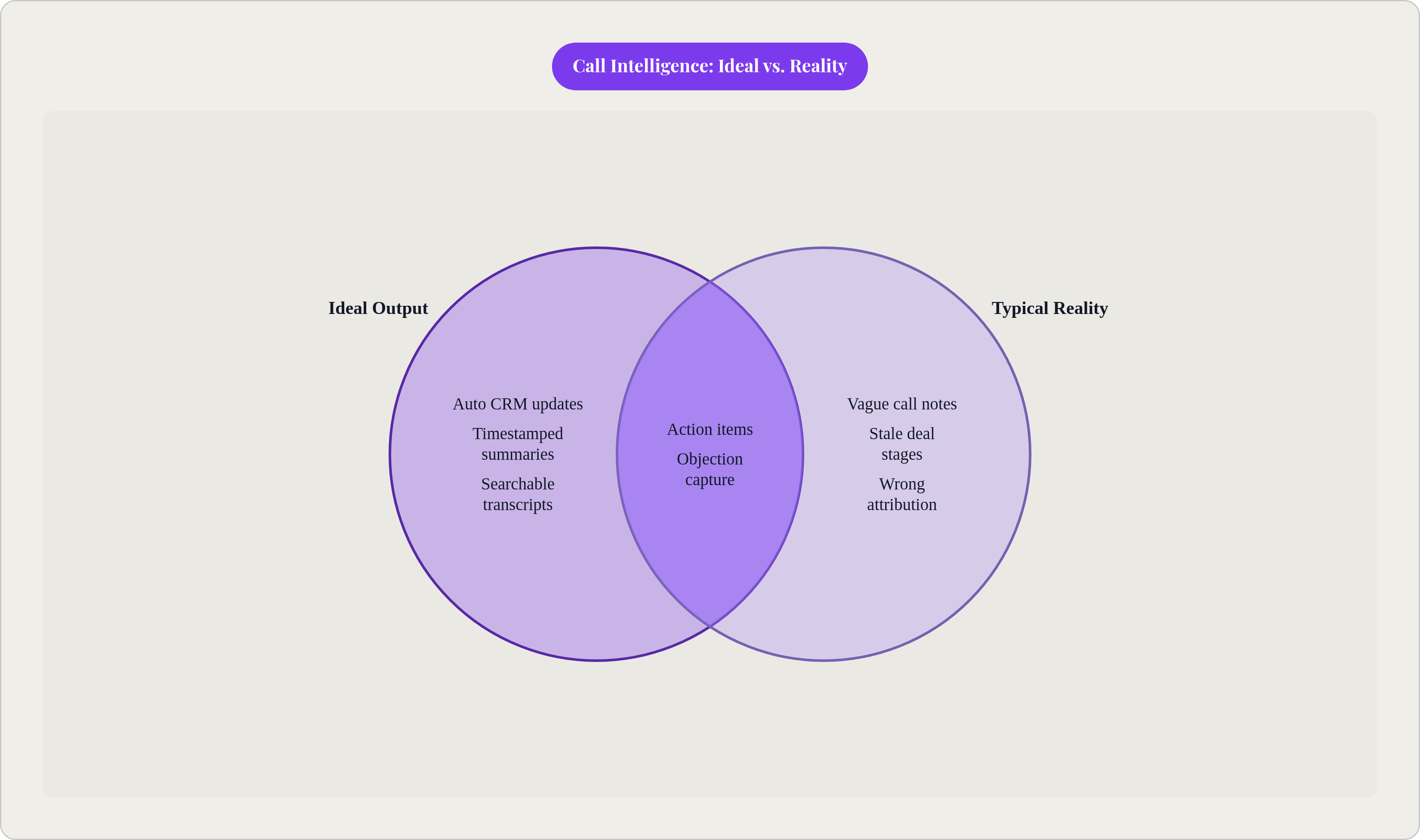
Picture the ideal version: a timestamped summary, action items with clear owners and dates, objections flagged and categorized, deal fields updated automatically, a transcript you can actually search later. All of it lands in the CRM without the rep typing a word.
Now picture what most teams actually have. A rep, three hours after the call, typing "good call, sending pricing" into a notes field before rushing to the next meeting. Teams that get a call intelligence system properly configured can cut manual documentation work by something like 90%. That phrase, "properly configured," is doing a lot of work in that sentence, and it's not a footnote. It's the whole ballgame.
Here's the part that should make anyone rolling this out a little nervous: hallucinated action items, meaning the model writes down a next step that was never actually agreed to. In practice, AI-generated action items are a known failure point, with hallucinations occurring at a rate that practitioners treat as a structural risk rather than an edge case, even under reasonably good audio conditions. It happens often enough that you plan around it instead of hoping around it.
The patterns are specific enough to catalog, and you should know them before you go live. A next step can get attributed to the wrong person, so "I'll send over the contract" turns into a task assigned to the prospect instead of your rep. A prospect's hedge, something like "maybe next week," can get flattened into a hard commitment with a due date. Or the model may invent a consensus that never formed, summarizing an unresolved pricing argument as though everyone had agreed to a number. The model isn't lying so much as filling gaps on its own, without the judgment to flag its own uncertainty. A hallucinated next step logged in a CRM doesn't stay theoretical, though. It shows up in a pipeline report, it shifts a deal stage, and a manager starts asking why a rep hasn't followed up on a commitment that was never real to begin with.
Audio quality matters more than you might expect, and so does speaker diarization: the system correctly figuring out who said what. Accents and regional dialects can still trip up transcription accuracy in ways that ripple straight into the summary. Your team needs a review layer, especially in the first few months, since the whole point is cutting busywork while keeping a human somewhere in the loop.
How coaching and deal intelligence emerge from aggregated call data
One call summary tells you what happened in that conversation and not much else. Stack up hundreds of them, structured the same way, and suddenly you can ask questions no single call could answer.
Which objection keeps showing up right before your deals stall at the proposal stage? Do your top performers actually talk less than average reps, or is that something your sales trainers repeat without ever checking the data? Which deals never once mentioned pricing or a timeline in any recorded call, and can that predict which ones go quiet? These are pattern questions, and patterns only surface from aggregated, consistently structured data, which is exactly why the summary quality problem from the last section isn't a side issue. It's a prerequisite.
Sales teams running AI coaching programs have reported win rates improving by 32%, and B2B companies using AI sales coaching are about 20% more likely to see stronger revenue outcomes than companies that skip it, per Highspot's 2025 State of Sales Enablement Report. Gong Labs reported in 2025 that teams using AI-driven deal coaching saw a 21% improvement in competitive win rates over teams still relying on static battlecards, the kind written once and forgotten in a shared drive somewhere nobody opens.
If you manage a sales team, this can change your job in a real way. Instead of sitting in on calls one at a time hoping to catch a teachable moment, you can review structured call data across your whole team and go straight to the deals or skill gaps that need attention. Same hours in your day, more reps actually covered.
Underneath it sits a pipeline with four stages, and each one has its own way of breaking.
What productivity gains look like in practice, and where the numbers come from
Companies adopting these tools often report productivity gains in the low double-digit percentage range right after rollout, per vendor figures. That's the headline number you'll hear quoted at every kickoff. The more interesting question, the one that actually matters for your team, is where those hours come from, since "productivity" means nothing until you take it apart.
Some of it is plain automation. Sales teams using these tools save roughly 12 hours per rep per week, which works out to something like three months of reclaimed working time over a year. LinkedIn reported in 2025 that AI research tools alone save reps about 1.5 hours a week. Survey data from 2024 showed 64% of reps saving somewhere between one and five hours weekly through automation generally. Automated CRM enrichment (the system filling in and updating fields on its own instead of a rep doing it by hand) cuts data decay by up to 65% and saves around 8 hours per rep per week on its own.
Then there's the smaller stuff that adds up quietly. Call wrap-up, logging notes and next steps right after hanging up, used to run 30 to 90 seconds per call. Multiply that across dozens of calls a day in a high-volume contact center and it becomes a real chunk of somebody's shift.
On the deal side: 69% of sellers using AI say they shortened their sales cycles by about a week on average, and 68% say AI helped them close more deals overall. Businesses using AI inside their CRM are 83% more likely to exceed their sales goals.
It's worth pausing on where these numbers actually come from, because most of it is vendor research or self-reported survey data, and the people answering the survey often have some reason to feel good about the tool they just paid for. That doesn't make the numbers wrong. It just means you should bring the same skepticism you'd apply to a testimonial on a landing page. Real results depend on how well the thing gets implemented, how disciplined the data stays, and whether anyone actually managed the rollout instead of flipping a switch and hoping. Some industry research has gone further, suggesting AI could effectively double active selling time by clearing out routine tasks. That's a claim about where the industry is headed, not a number stapled to your specific sales floor. The realistic version looks like faster follow-up, cleaner records, better coaching inputs, with the size of the gain tied directly to how seriously the implementation gets taken.
The main platforms and what distinguishes them from each other
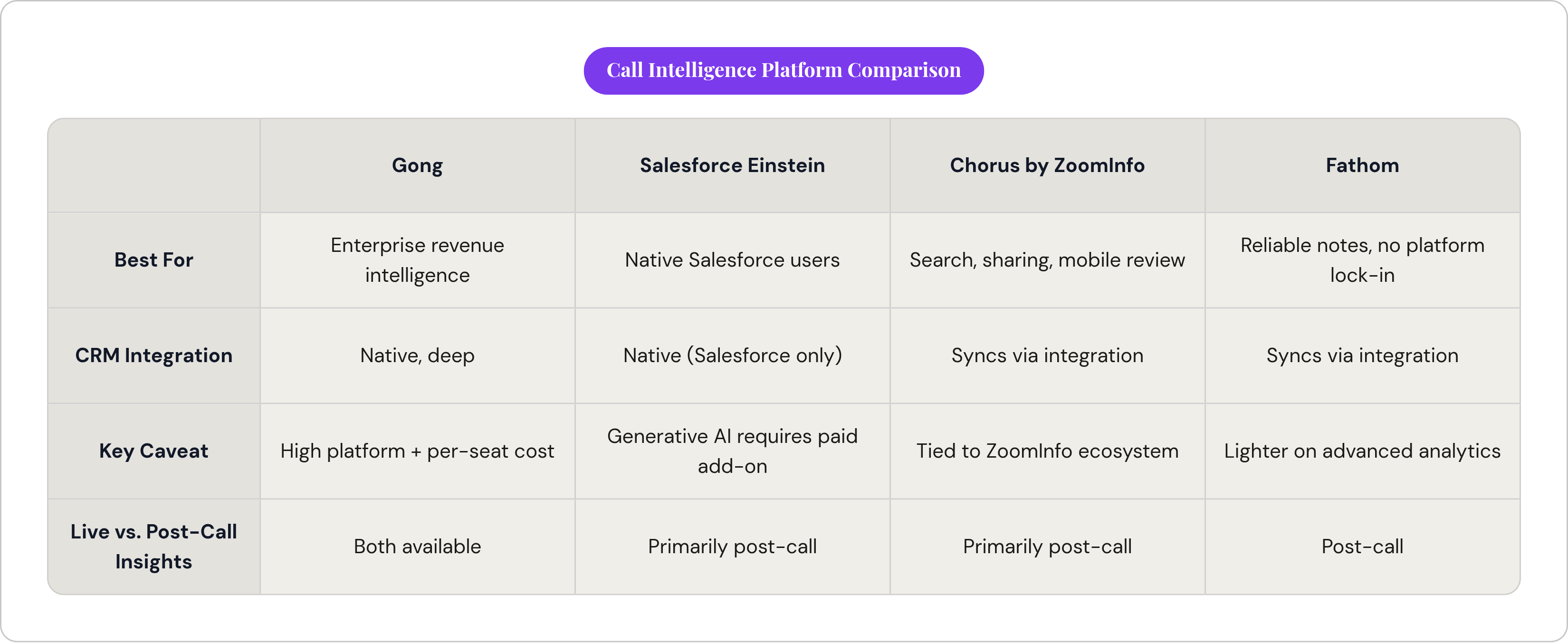
No single best tool here, only better fits for different problems and different budgets. Worth walking the landscape by use case rather than by ranking, since a tool built for a 20-person startup and one built for a 2,000-seat enterprise org are solving different problems entirely.
Gong sits at the top of the revenue intelligence category, capturing and analyzing sales conversations in real depth. Pricing runs somewhere in the mid-to-high hundreds of dollars per seat, plus a platform fee that isn't small. It's built for enterprise teams that want a full revenue intelligence layer, not just call notes.
Salesforce's Einstein Conversation Insights lives natively inside Salesforce, supports multiple languages, and connects to Zoom, Meet, Teams, and the major voice providers. It generates summaries with next steps and customer feedback built in. One catch worth flagging: the generative AI summary layer requires a separate Einstein for Sales add-on. It doesn't come bundled with base Salesforce, and that trips people up during budgeting more often than you'd think.
Chorus by ZoomInfo records and transcribes across phone, video, and email, with strong search and sharing features and a mobile app for reviewing calls away from a desk. Clari and Salesloft have combined into a revenue AI suite, positioning themselves for enterprise sales teams looking for an integrated platform.
Fathom has built a strong reputation among teams that want reliable meeting notes without buying into a full platform commitment. Below the enterprise tier, a range of mid-market tools serve teams that want solid summarization and CRM sync without enterprise pricing or enterprise complexity, with per-user costs well below what enterprise platforms charge once per-seat fees and platform fees stack up at scale.
When you compare any of these, check: (i) whether insights arrive live or only after the call ends, (ii) whether CRM integration is native or leans on middleware, (iii) how much custom insight categories and methodology support the platform offers, (iv) whether a real review and correction workflow exists for the AI output, (v) how PII redaction and compliance get handled, and (vi) whether pricing is per-seat, a platform fee, or both stacked on top of each other.
How to evaluate and implement a call intelligence system without repeating common mistakes
Most implementations that fail don't fail because someone picked the wrong tool. They fail at the data discipline stage and the change management stage, both far less fun to talk about at a sales kickoff, and both matter more than the vendor demo ever will.
Start with the CRM schema itself, before the tool goes anywhere near production. If the destination fields are vague, inconsistent, or half of them are duplicates nobody remembers creating, structured AI output has nowhere good to land. Clean that up first. It's boring, unglamorous work, and it's also the actual foundation everything else sits on.
Adoption isn't the bottleneck anymore, not really. 81% of organizations were projected to use AI-powered CRM systems in 2025, and 87% of call centers were projected to integrate some form of AI call summary software. The real question now is implementation quality.
Before deployment, define what "good" looks like in concrete terms. Which fields absolutely must get filled in after every call? What counts as a complete next step: does it need an owner, an action, and a date, or is "follow up soon" acceptable? (It isn't.) Which objection categories or topics matter enough to the business to track specifically? Answer these before the tool goes live, not three months in once everyone's already annoyed at it.
Build a review layer into your first 60 to 90 days. Have your reps or managers spot-check summaries for hallucinated action items and wrong attribution before anyone treats those records as ground truth. And use the hallucinations productively: patterns in where the model gets things wrong can often point to something fixable, whether that's audio quality on certain call types, meeting structure, or a prompt that needs adjusting.
Don't wait around for "enough" data before starting a coaching program either. Start reviewing call patterns within the first month, let early findings set your coaching norms, and adjust as more data rolls in. Resist the urge to run call intelligence as its own island; summaries that automatically update deal stages, trigger follow-up tasks, and feed straight into pipeline reviews are worth far more than summaries sitting in a dashboard three people check once a month and then forget exists.
Track leading indicators before you expect win rates to move, specifically: (i) time spent on post-call documentation, (ii) CRM field completion rates, and (iii) how fast your reps follow up after a call. Those shift first, and they tell you whether the system is working before the bigger revenue numbers catch up, assuming they catch up at all.
The tool captures what happened on the call. What your team does with that information is still a human call, and that part doesn't automate away, no matter how good the model gets. Good call intelligence can sharpen a sales process that already works. No amount of transcription accuracy will build one from scratch.
Sources
- https://help.salesforce.com/s/articleView?id=sales.eci_call_summaries.htm&language=en_US&type=5
Provided details on Salesforce Einstein Conversation Insights features, language support, integrations, and the requirement for a separate Einstein for Sales add-on.